> For the complete documentation index, see [llms.txt](https://docs.luciq.ai/llms.txt). Markdown versions of documentation pages are available by appending `.md` to page URLs; this page is available as [Markdown](https://docs.luciq.ai/product-guides-and-integrations/product-guides/application-performance-monitoring/app-launch.md).
# App Launch
Monitor app launch performance with Luciq APM. Track cold, warm, and hot launch times for your mobile app to optimize startup speed and experience.
{% hint style="warning" %}
Starting from **SDK 19.0.0**, we’ve refined how app launch duration is captured for improved accuracy.\
The duration is now measured **from app startup until** `UIApplication.didBecomeActiveNotification` **notification**, which marks the point when the app is fully active and ready to receive user interactions.
{% endhint %}
### Cold App Launch
Luciq automatically measures your **cold app launch** latency, which is the time between when your user launches the app from scratch and when it is responsive and accepting touch events.
It starts with the process start time and stops at the end of the first run loop. This interval accounts for any launch-blocking logic in your code, as well as the time before your app classes are loaded. It includes loading dynamic frameworks and resolving any dynamic references made in the binary.
***
### Hot App Launch
The Luciq SDK automatically measures the **hot app launch** latency, which is the time between the user launching the app from the background and it becoming responsive and accepting touch events.
Hot Launch is transitioning the app from the background to the foreground-active state. We capture the Hot Launch event by observing a `UIApplicationWillEnterForegroundNotification` notification, which is then followed by `UIApplicationDidBecomeActiveNotification`.
***
### End App Launch
In the event that you'd like to define a specific point in time where the app launch can be considered complete, such as when the app is actually interactable, you can use the end app launch API to set that point. You'll then be able to see this data alongside the automatic cold and hot app launches that were captured.
***
### App Launch Apdex
Luciq calculates an Apdex score for your app launch that reflects how satisfying your app launch time is. Your Apdex score ranges between 0 and 1; a higher value means better performance and, hence, a better user experience:
* Apdex score ≥ 0.94 equates to **Excellent** performance.
* Apdex score ≥ 0.85 and < 0.94 equates to **Good** performance.
* Apdex score ≥ 0.7 and < 0.85 equates to **Fair** performance.
* Apdex score ≥ 0.5 and < 0.7 equates to **Poor** performance.
* Apdex score < 0.5 is considered **Unacceptable**.
### How Is The App Launch Apdex Calculated?
When an app launch occurrence is collected, it is flagged based on a pre-defined target (T). An app launch occurrence is considered:
* **Satisfying:** if its duration ≤ T
* **Tolerable:** if its duration > T and ≤ 4T
* **Frustrating:** if its duration > 4T
Then, based on the bucketing explained above, the Apdex score is calculated as follows:
* Total occurrences = Satisfying occurrences + Tolerable occurrences + Frustrating occurrences
* Apdex score = (Satisfying occurrences + 0.5 \* Tolerable occurrences) / Total occurrences
### How Can You Control Your App Launch Target?
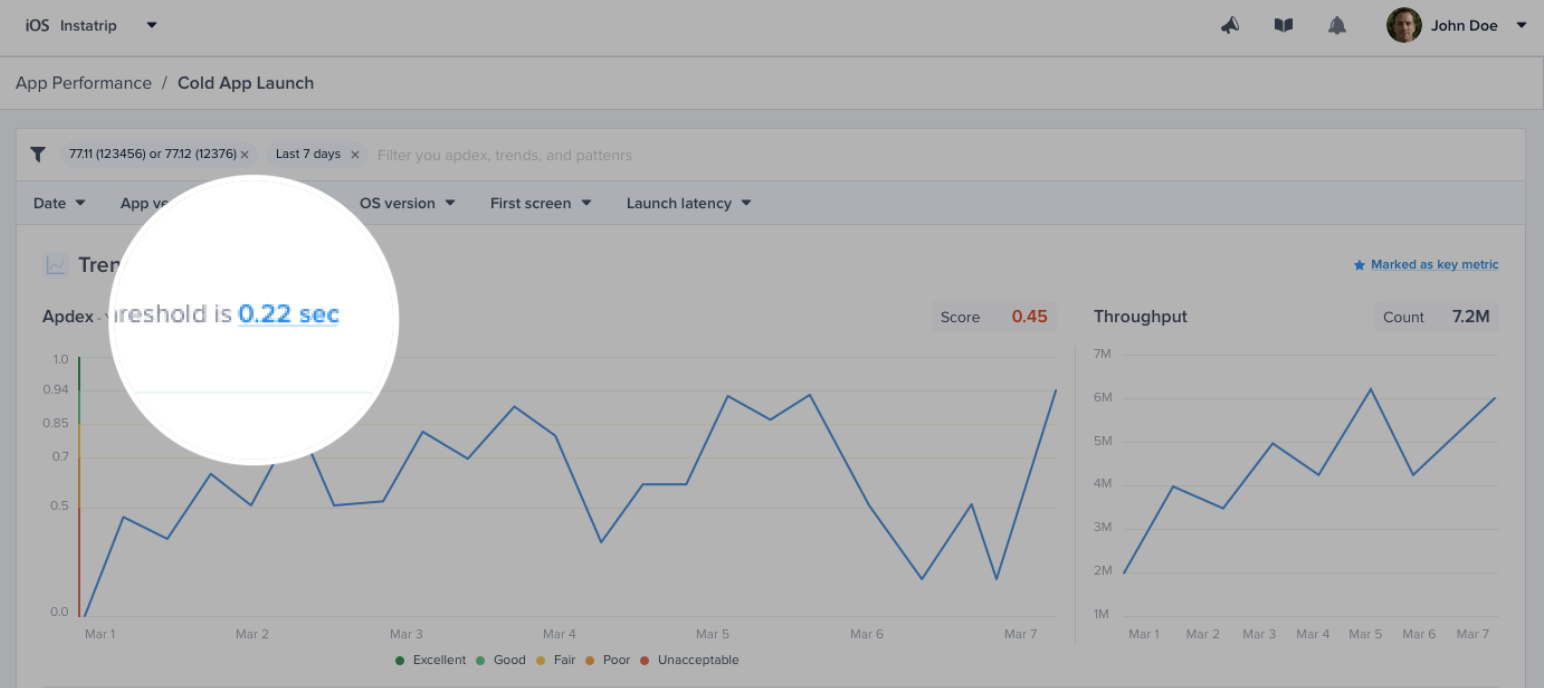
By default, the target is set to **0.5 seconds**; however, you can easily change this number from your dashboard by clicking on the action highlighted in the screenshots below.
{% hint style="info" %}
Please note that updating your app launch target does **not** affect the already stored occurrences; only future occurrences will be flagged using the new target.
{% endhint %}
---
# Agent Instructions
This documentation is published with GitBook. GitBook is the documentation platform designed so that both humans and AI agents can read, navigate, and reason over technical content effectively. Learn more at gitbook.com.
## Querying This Documentation
If you need additional information that is not directly available in this page, you can query the documentation dynamically by asking a question.
Perform an HTTP GET request on the current page URL with the `ask` query parameter, and the optional `goal` query parameter:
```
GET https://docs.luciq.ai/product-guides-and-integrations/product-guides/application-performance-monitoring/app-launch.md?ask=&goal=
```
`ask` is the immediate question: it should be specific, self-contained, and written in natural language.
`goal` is optional and describes the broader end goal you are ultimately trying to accomplish on behalf of the user. GitBook uses it to tailor the answer towards what is most useful for that goal.
The response will contain a direct answer to the question and relevant excerpts and sources from the documentation.
Use this mechanism when the answer is not explicitly present in the current page, you need clarification or additional context, or you want to retrieve related documentation sections.