> For the complete documentation index, see [llms.txt](https://docs.luciq.ai/llms.txt). Markdown versions of documentation pages are available by appending `.md` to page URLs; this page is available as [Markdown](https://docs.luciq.ai/android/set-up-luciq-for-android/integrate-luciq-on-android.md).
# Integrate Luciq on Android
Integrate the Luciq SDK into your Android app step by step. Enable bug reporting and crash reporting with our comprehensive Android setup guide.
{% hint style="warning" %}
#### Compile SDK Version
Please note that the `compileSDKVersion` should be v29 or above, otherwise you may run into build errors.
{% endhint %}
## Get started in seconds
### Option 1 — Set up with an AI coding agent (recommended)
In your AI editor, paste:
```
Set up Luciq SDK in this project in one shot!
1. Install the Luciq agent skills: `npx luciq-skills install`
2. Setup and authenticate Luciq MCP server to this project
3. Add the Luciq SDK to this project
```
Check the [skills](https://docs.luciq.ai/product-guides-and-integrations/product-guides/ai-features/agent-skills) and [MCP](https://docs.luciq.ai/product-guides-and-integrations/product-guides/ai-features/luciq-mcp-server) docs for more details.
### Option 2 — Install manually
This installation process will install the Luciq SDK that supports [Bug Reporting](https://www.luciq.ai/platform), [Crash Reporting](https://www.luciq.ai/platform) and [App Performance Monitoring](https://www.luciq.ai/platform).
#### Gradle
Add this line to your `build.gradle` file.
{% tabs %}
{% tab title="Gradle" %}
```gradle
implementation 'ai.luciq.library:luciq:19.6.0'
```
{% endtab %}
{% endtabs %}
#### Maven
{% tabs %}
{% tab title="Maven" %}
```gradle
ai.luciq.libraryluciq19.6.0
```
{% endtab %}
{% endtabs %}
## Using Luciq
In your `Application` class add this line to your `onCreate` method. This initializes Luciq with the default invocation event, *Shake*.
{% tabs %}
{% tab title="Kotlin" %}
{% code overflow="wrap" %}
```kotlin
Luciq.Builder(this, "APP_TOKEN").build()
```
{% endcode %}
{% endtab %}
{% tab title="Java" %}
{% code overflow="wrap" %}
```java
new Luciq.Builder(this, "APP_TOKEN").build();
```
{% endcode %}
{% endtab %}
{% endtabs %}
Initializing [Luciq](https://www.luciq.ai/platforms) in your application can also be done using one or multiple invocation events. All possible invocation events are explained in the [invocation](https://docs.luciq.ai/android/set-up-luciq-for-android/set-up-bug-reporting/showing-luciq) section.
{% tabs %}
{% tab title="Kotlin" %}
```kotlin
Luciq.Builder(this, "APP_TOKEN")
.setInvocationEvents(LuciqInvocationEvent.SHAKE, LuciqInvocationEvent.FLOATING_BUTTON)
.build()
```
{% endtab %}
{% tab title="Java" %}
```java
new Luciq.Builder(this, "APP_TOKEN")
.setInvocationEvents(LuciqInvocationEvent.SHAKE, LuciqInvocationEvent.SCREENSHOT)
.build();
```
{% endtab %}
{% endtabs %}
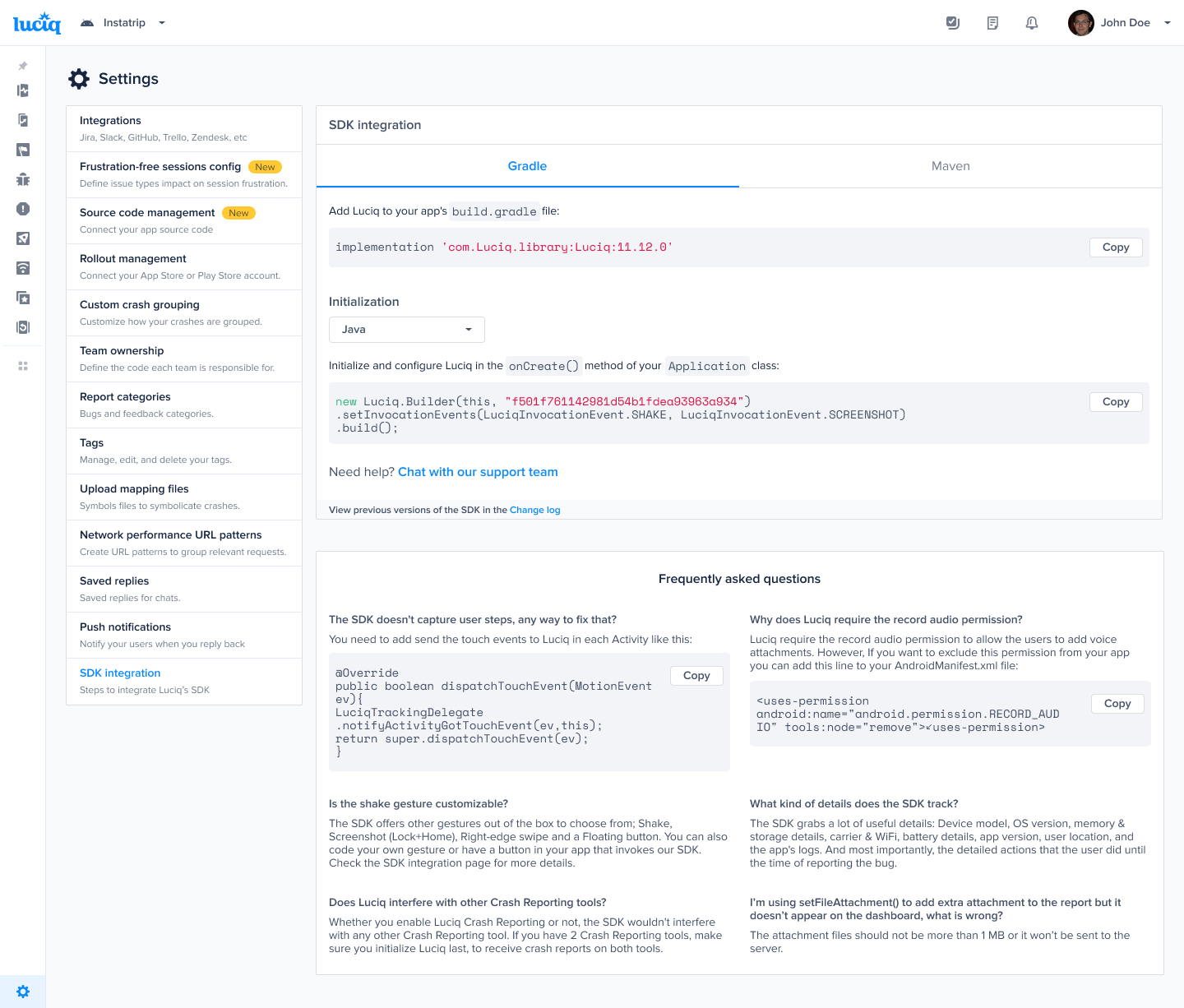
You can find your app token by selecting **SDK Integration** in the **Settings** menu of your [Luciq dashboard](https://dashboard.luciq.ai/dashboard).
#### Permissions
Permissions are automatically added to your `AndroidManifest.xml` file. Some of them are required to be able to fetch information like network and WiFi connection. Others are used to allow your users to attach images, videos, and audio recordings. In general, permission requests don't appear unless your user attempts to use a feature requiring a permission.
The only exception is if you set the [invocation event](https://docs.luciq.ai/android/set-up-luciq-for-android/set-up-bug-reporting/showing-luciq) to be a *Screenshot*. In that case, the storage permission will be requested when your application launches. The screenshot invocation is a special case because there is no native event that tells the SDK that a screenshot has been captured. The only way to know is to monitor the screenshots directory. The SDK is invoked when a screenshot is added to the directory while your application is active.
{% tabs %}
{% tab title="XML" %}
{% code overflow="wrap" %}
```xml
```
{% endcode %}
{% endtab %}
{% endtabs %}
You can remove any of the permissions if you will not be using the feature associated with it, as in the following example.
{% tabs %}
{% tab title="XML" %}
{% code overflow="wrap" %}
```xml
```
{% endcode %}
{% endtab %}
{% endtabs %}
{% hint style="warning" %}
#### Required Permissions
There are a few permissions that are always required and cannot be removed. These permissions are:\
``\
``
{% endhint %}
{% hint style="info" %}
#### **16KB Compatibility**
From Android 15 (API 35), native (.so) libraries must support 16KB page sizes. Luciq supports this starting from version **13.4.0**. Please upgrade if your app targets Android 15+ to avoid crashes. [Learn more](https://developer.android.com/guide/practices/page-sizes?hl=en).
{% endhint %}
---
# Agent Instructions
This documentation is published with GitBook. GitBook is the documentation platform designed so that both humans and AI agents can read, navigate, and reason over technical content effectively. Learn more at gitbook.com.
## Querying This Documentation
If you need additional information that is not directly available in this page, you can query the documentation by asking a question.
Perform an HTTP GET request on the following URL with the `ask` and `goal` query parameters:
```
GET https://docs.luciq.ai/android/set-up-luciq-for-android/integrate-luciq-on-android.md?ask=&goal=
```
`ask` is the immediate question: it should be specific, self-contained, and written in natural language.
`goal` is what the user is ultimately trying to achieve, the reason they need the answer. Sharing it helps GitBook give you a better, more relevant answer. A goal is most helpful when it describes the outcome the user wants rather than restating the question. For example, with `ask=how do I create an API token`, a goal like `automate deployments from our CI pipeline` lets GitBook tailor the answer to that use case.
The response will contain a direct answer to the question and relevant excerpts and sources from the documentation.
Use this mechanism when the answer is not explicitly present in the current page, you need clarification or additional context, or you want to retrieve related documentation sections.