> For the complete documentation index, see [llms.txt](https://docs.luciq.ai/llms.txt). Markdown versions of documentation pages are available by appending `.md` to page URLs; this page is available as [Markdown](https://docs.luciq.ai/changelog/readme/2026-08.md).
# August 2026
Luciq product updates shipped in August 2026: the AI Features Control Center, survey AI summaries, the Luciq Agent beta, funnel alerts, and new MCP tools.
16 product updates shipped in August 2026. See [Product Updates](/changelog/readme.md) for the latest.
{% updates format="full" %}
{% update date="2026-08-31" tags="no-sdk-update-required" %}
## AI Features Control Center
#### Summary
Every AI feature toggle on your workspace now lives on one Settings page, gated to Owners and Admins. No more hunting through per-product settings to see what is on.
#### What's new?
* A new **AI Features Control Center** page under **Settings → Workspace** consolidates every AI feature toggle on your workspace into a single place. Bug Grouping, Opportunities, and Survey AI features each have their own section.
* In-product banners still ask for consent, but every banner now redirects here instead of to a per-product settings page.
* Only **Owners** and **Admins** can enable or disable AI features from this page. Members and Viewers see the page as read-only.
* Enabling Opportunities also enables Survey AI features by default, since Opportunities reads survey responses. Survey AI features can still be turned off separately.
#### Why this matters?
* One page, one place. Consent, review, and audit of every AI feature on the workspace no longer requires visiting three different settings screens.
* Role-based access means only admins and owners can change AI feature state, matching the way security and legal teams expect AI settings to be governed.
Documentation
{% endupdate %}
{% update date="2026-08-31" tags="no-sdk-update-required" %}
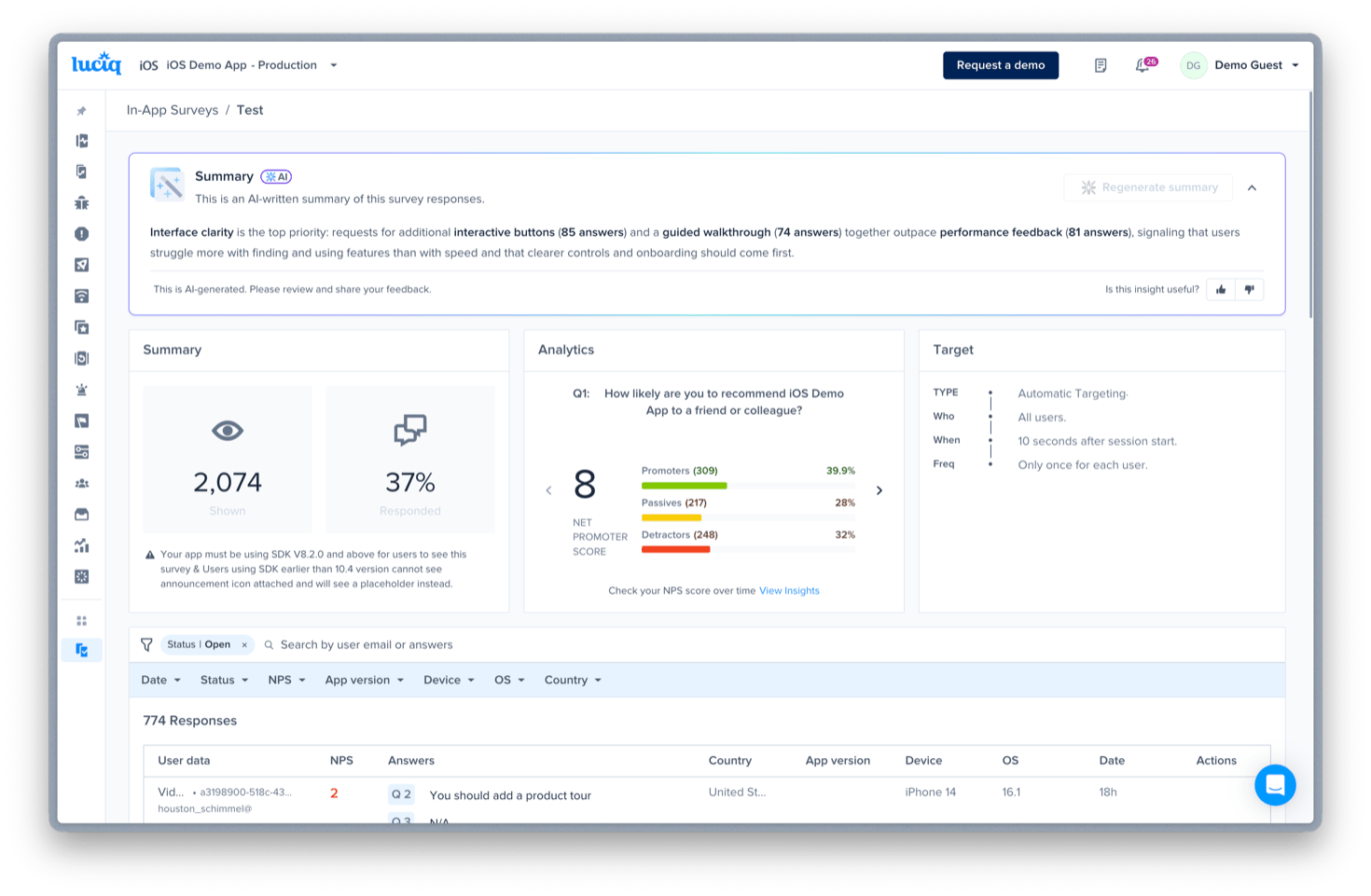
## AI Summary for survey responses
#### Summary
Survey details pages now open with an AI-written summary of the responses: top themes, sentiment, and notable feedback, without reading every response yourself.
#### What's new?
* The survey details page now includes an **AI-written summary** of the responses at the top of the page. The summary calls out the top themes, sentiment, and notable feedback from free-text answers, alongside NPS scores, ratings, and MCQ distributions where relevant.
* Available on all three survey types: **NPS**, **App Rating**, and **Custom**.
* Generation is triggered on demand with a **Generate summary** action. The summary can be regenerated every 6 hours as new responses come in.
* Each summary carries a **thumbs-up / thumbs-down** feedback control so you can tell us when the summary was useful and when it missed.
#### Why this matters?
* Reading hundreds or thousands of survey responses one by one to find the pattern is the workflow this replaces. The summary is a starting point, not the final read, and it links back to the responses that drove each theme.
#### Availability
* Available to all customers. Enable **Survey AI features** in **Settings → Workspace → AI Features Control Center** to switch it on.
{% endupdate %}
{% update date="2026-08-17" tags="no-sdk-update-required" %}
## MCP: check how far a release has rolled out
#### Summary
Ask your agent how far a release has actually rolled out before you read anything into its crash or performance numbers. Sessions and users per version, with an optional 14-day trend.
#### What's new?
* A new Luciq MCP tool, **`app_version_adoption`**, reports how widely one or more app versions are adopted: sessions and distinct users each version captured in the last 48 hours, each as a share of the app total, plus when the version was first seen.
* Pass specific `app_versions` to compare releases side by side, or omit them to get the most recent releases. Add `include_daily_trend` for a 14-day daily series showing how adoption climbed since release.
#### Why this matters?
* Before this, judging a release's health meant reading crash and performance numbers without knowing how much of your user base had actually reached that version yet. Now your agent can check rollout and stability together in one conversation.
#### Availability
* Available to all Luciq MCP users, no plan gate.
Documentation
{% endupdate %}
{% update date="2026-08-13" tags="no-sdk-update-required" %}
## Agent Skills now come with the Luciq MCP
#### Summary
Your agent fetches Luciq's agent skills straight from the MCP server and follows them on its own. Nothing to install, and nothing to reinstall when we publish a new one.
#### What's new?
* A new **`get_luciq_skills`** MCP tool serves Luciq's agent skills, the step-by-step guides that orchestrate the other MCP tools for multi-step jobs such as investigating a production signal, producing an app-health readout, configuring or tuning alerts, verifying an SDK upgrade, deduplicating bugs, or auditing PII masking.
* Call it with no arguments for an index of every skill, pass a skill's `name` for its full guide, or pass `name` and `file` together for a reference file the guide points at.
* Your agent does this by itself. Before it starts a multi-step Luciq job it checks whether a skill covers it, then follows that skill.
#### Why this matters?
* Skills used to reach you only through a separate install, from a marketplace or npm, and every one of those was a point-in-time copy. A skill we published after you installed never reached you, and if you connected the MCP without installing anything, you had no skills at all.
* Now the server carries them. Connect the MCP and your agent has the current set.
#### Notes
* Already installed the skills locally? Your local copies still take precedence, so nothing you have changes.
* The served index refreshes at least daily, so a newly published skill reaches you within a day rather than instantly.
Documentation
{% endupdate %}
{% update date="2026-08-12" tags="no-sdk-update-required" %}
## Filter bugs by user attributes in list\_bugs
#### Summary
Scope a bug list to the reporters carrying a specific custom user attribute, straight from MCP. Triage one cohort at a time instead of the whole list.
#### What's new?
* The `list_bugs` MCP tool now accepts **`filters.user_attributes`**, so your agent can scope a bug list to the reporters carrying a specific custom user attribute.
* Keys are attribute names exactly as your SDK reports them, and each one maps to a single condition using `equal`, `not_equal`, `contain`, or `not_contain`. Multiple attributes are AND-ed together.
* Attributes that the application doesn't know about are ignored rather than rejected.
#### Why this matters?
* Triage by the segment that matters instead of the whole list. Ask for "all the reports from users on the `plan-b` plan" and work only those, with no export to a spreadsheet first.
#### Notes
* You have to name the attribute you want to filter on. There is no MCP call that enumerates the attributes an app has reported.
Documentation
{% endupdate %}
{% update date="2026-08-12" tags="no-sdk-update-required" %}
## Agent activity is now logged on the bug it changed
#### Summary
Actions taken through the Luciq MCP now appear in a bug's Activity & Comments, labeled "via MCP", alongside everything a teammate did. Tag changes are logged too.
#### What's new?
* Actions taken through the Luciq MCP now appear in a bug's **Activity & Comments** section, labeled **"via MCP"**.
* Adding or removing a **tag** is now logged in **Activity & Comments** too, whether the change came from the MCP or from the dashboard.
#### Why this matters?
* When an agent triages a bug on your behalf, the change is on the record next to everything a teammate did. You can see what happened, and who or what did it, without reconstructing it afterwards.
{% endupdate %}
{% update date="2026-08-12" tags="no-sdk-update-required" %}
## Funnels: OR-grouped steps on the dashboard, plus funnel alerts
#### Summary
A funnel step can now group several events with OR, so one step covers every path that reaches it. Alerts can fire on a funnel's drop-off rate or its volume.
#### What's new?
* **A funnel step can now be an OR group.** Combine several events on a single step, whether custom events, screens, or network calls, and a session clears that step as soon as **any** of them occurs.
* The funnel shows the **overall conversion across every OR-ed event** on the step, and hovering breaks out the conversion for each event individually.
* **Alerts on funnels.** Create an alert on a funnel's **drop-off rate** or on its **volume**, meaning the number of users entering the funnel.
#### Why this matters?
* A step like "user reached checkout" can cover every path that gets there, instead of forcing one route or splitting the journey into separate funnels.
* A sudden drop-off in a checkout funnel now surfaces on its own, rather than waiting for someone to open the dashboard.
{% endupdate %}
{% update date="2026-08-12" tags="no-sdk-update-required" %}
## "Open in" hands a bug report to Claude or Cursor
#### Summary
Every bug report now has an Open in dropdown for Claude Web, Claude CLI and Cursor. It opens the tool with a prompt that already pulls the bug's details and logs.
#### What's new?
* Every bug report on the dashboard now has an **Open in** dropdown, offering **Claude Web**, **Claude CLI**, and **Cursor**.
* The action opens the tool with a prompt already filled in. That prompt uses the Luciq MCP to pull the bug's details and logs, then asks the agent to debug it, find the root cause, and suggest a fix.
#### Why this matters?
* No copying dashboard links or pasting bug context by hand. One click turns a bug report into a debugging session that already has the full picture.
#### Availability
* Live for all customers on the dashboard. No SDK update required.
{% endupdate %}
{% update date="2026-08-06" tags="no-sdk-update-required" %}
## Crash context for agents: aggregated logs and the pre-crash sequence
#### What's new?
* **Logs Aggregation.** Every log line written before the crash, aggregated across occurrences, each with a percentage showing how often it appears. A line on 98% of occurrences is part of the crash. A line on 4% is noise.
* **Pre-Crash Sequence.** Not all the logs, but *the* sequence: the most common ordered path into the crash, distilled from thousands of occurrences.
* Both are also available through the Luciq MCP.
#### Why this matters?
* Aggregations already gave an agent the crash. These add the two things that actually resolve one: what the code was doing, and what the most common path to failure looks like.
* Turns "it crashes sometimes" into an ordered sequence you can reproduce, instead of inferring a story from a single occurrence's details.
{% endupdate %}
{% update date="2026-08-05" tags="no-sdk-update-required" %}
## Filter Session Replay by bugs
#### What's new?
* You can now filter the sessions list by **bugs**, narrowing replays to the sessions where a user reported an issue from inside your app.
#### Why this matters?
* Go straight to the sessions that came with a user's own account of what went wrong, instead of scrubbing through replays looking for the one that matches a report.
* Part of an ongoing push on Session Replay filtering to cut through the noise.
{% endupdate %}
{% update date="2026-08-05" tags="no-sdk-update-required" %}
## Luciq Agent: your in-dashboard AI assistant is now in beta
#### What's new?
* **A conversational AI assistant now lives inside the Luciq dashboard.** Click the sparkle icon in the header and ask anything about your app in plain English.
* **Every Luciq product, one conversation.** Crashes, APM, bug reports, hangs, reviews, surveys, opportunities, alerts, and app health, all in the same thread.
* **Grounded in your live data.** Every response is a real query against your account, using the same permissions as your dashboard user.
* **Context-aware.** The agent picks up which app and environment you're on from the page you're viewing, so you don't have to spell it out.
* **Investigate, then act.** The agent can take actions on your data, and every write pauses for your explicit approval before it runs.
#### Why this matters?
* Skip the dashboard hunt. No more opening three tabs, filtering menus, or exporting to find an answer.
* Multi-product synthesis in one thread. Ask *"which crashes are showing up in our 1-star reviews?"* and get the answer, not just a description of how to look it up.
* Follow-ups keep context, so you can refine or pivot topics without restarting.
#### Availability
* In beta, enabled for every enterprise account.
* No SDK update required.
* Contact your Customer Success Manager or Luciq Support if you don't see it in your dashboard.
Documentation
{% endupdate %}
{% update date="2026-08-05" tags="no-sdk-update-required" %}
## MCP: drill into AI-detected issues and their screenshots
#### What's new?
* Two new Luciq MCP tools for AI-detected issues: **`ai_issue_details`** returns the group summary and a paginated occurrence history for a single `visual_issue` or `broken_functionality` issue, and **`ai_issue_occurrence_details`** returns one occurrence's full context together with its screenshots.
* Use the `id` and `issue_type` of an AI-detected issue surfaced by `list_issues` to pull its details, then an occurrence's `number` to fetch that occurrence's screenshots.
#### Why this matters?
* Previously, `list_issues` could surface an AI-detected issue but your agent had no way to inspect it further from MCP. Now it can pull the full occurrence history and see the actual screenshots without leaving your IDE.
Documentation
{% endupdate %}
{% update date="2026-08-05" tags="no-sdk-update-required" %}
## Bug Grouping: sharper AI summaries that refresh as a group grows
#### What's new?
* Group AI summaries now reflect the same signals your grouping logic uses: when Bug Grouping considers **Network Logs** and **User Steps**, those are factored into the summary alongside the report titles.
* Summaries regenerate automatically as a group grows — refreshed when the group reaches **3 duplicates**, and again at **7 duplicates**.
* Each refresh considers **all** duplicates in the group, including manually-marked ones, rather than a truncated batch.
#### Why this matters?
* Understand a whole group at a glance without opening each duplicate.
* A group with 20+ duplicates reflects the full pattern, not just the first report that created it.
* Summaries carry real technical signals, not just titles, so they point closer to the root cause and speed up triage.
#### Availability
* Enabled by default on top of existing Bug Grouping. No SDK update required.
* Applies going forward: only groups that gain new duplicates after the release get the refreshed summary, and existing groups are not backfilled. Only automatic grouping triggers re-summarization, and a group's **title** is set once and stays fixed while the summary regenerates.
Documentation
{% endupdate %}
{% update date="2026-08-04" tags="no-sdk-update-required" %}
## Opportunities now learn from your In-App Surveys
#### What's new?
* **Survey responses are now a third source for Opportunities**, alongside bug reports and app store reviews, with no extra setup as long as Opportunities is enabled.
* Similar requests from survey responses are grouped into themes across questions and surveys, so a single Opportunity can be backed by evidence from multiple surveys at once, together with other sources like Bug Reporting and App Reviews.
* The **Sources** panel shows which survey and question drove the Opportunity and links back to the survey, the same as it already does for bugs and reviews.
#### Why this matters?
* Your surveys feed directly into the "what should we build next?" list, with no manual stitching across products.
#### Availability
* Available for customers on **production** for now. Single-tenant customers need to reach out first.
* Picks up going forward only: responses collected from now on are included, with no backfill of older surveys.
Documentation
{% endupdate %}
{% update date="2026-08-03" tags="no-sdk-update-required" %}
## Per-user debugging and session replay in Luciq MCP
#### What's new?
* Two new Luciq MCP tools: **`user_summary`** and **`list_session_replays`**.
* `user_summary` returns one end user's devices, OS and app versions, sessions, per-metric APM occurrences by Apdex class, and the crashes and bugs they hit, all in a single call.
* `list_session_replays` lists recorded sessions for an app, newest first, with a dashboard deep link on every row. It's also the only MCP tool that can look a user up by email.
* Several existing tools (`list_crashes`, `list_app_hangs`, `list_bugs`, `list_occurrences_tokens`, `apm_list_groups`, `apm_group_view`, `apm_occurrence`) can now filter by specific user IDs.
#### Why this matters?
* Support and engineering can go from "a user reported X" to that person's full picture, devices, performance, crashes, and bugs, without leaving the IDE or chaining several separate queries.
#### Availability
* Available to all Luciq MCP users. `user_summary` requires the APM plan feature and `list_session_replays` requires the Session Replay plan feature.
Documentation
{% endupdate %}
{% update date="2026-08-02" tags="no-sdk-update-required" %}
## Funnel steps now support OR-grouped events
#### What's new?
* The `apm_funnel_write` MCP tool takes an ordered `steps` array, and each step is an OR group of up to 5 events. A session completes the step as soon as **any** of that step's events occurs.
#### Why this matters?
* Funnels can model steps with more than one valid path, for example an "add to cart" step that counts whether it happened from the product page or the cart drawer, without splitting them into separate funnels.
Documentation
{% endupdate %}
{% endupdates %}
---
# Agent Instructions
This documentation is published with GitBook. GitBook is the documentation platform designed so that both humans and AI agents can read, navigate, and reason over technical content effectively. Learn more at gitbook.com.
## Querying This Documentation
If you need additional information that is not directly available in this page, you can query the documentation by asking a question.
Perform an HTTP GET request on the following URL with the `ask` and `goal` query parameters:
```
GET https://docs.luciq.ai/changelog/readme/2026-08.md?ask=&goal=
```
`ask` is the immediate question: it should be specific, self-contained, and written in natural language.
`goal` is what the user is ultimately trying to achieve, the reason they need the answer. Sharing it helps GitBook give you a better, more relevant answer. A goal is most helpful when it describes the outcome the user wants rather than restating the question. For example, with `ask=how do I create an API token`, a goal like `automate deployments from our CI pipeline` lets GitBook tailor the answer to that use case.
The response will contain a direct answer to the question and relevant excerpts and sources from the documentation.
Use this mechanism when the answer is not explicitly present in the current page, you need clarification or additional context, or you want to retrieve related documentation sections.