> For the complete documentation index, see [llms.txt](https://docs.luciq.ai/llms.txt). Markdown versions of documentation pages are available by appending `.md` to page URLs; this page is available as [Markdown](https://docs.luciq.ai/product-guides-and-integrations/product-guides/inbox/opportunities.md).
# Opportunities
Let AI read your users' bug reports, app store reviews, and survey responses and synthesize them into a prioritized list of what to build next.
Opportunities is an AI-powered tab inside the **Inbox** that turns your users' feedback into a prioritized, actionable list of product improvements. Every hour, the AI reads new **bug reports**, **app store reviews**, and **survey responses**, identifies the recurring themes your users keep raising, and surfaces them as *Opportunities*, each ranked by priority and backed by the exact reports that triggered it.
Until now, answering *"what should we build next?"* meant context-switching between Bug Reporting, App Ratings & Reviews, and In-App Surveys, then manually stitching the signals together. Opportunities collapses that into one place, powered by your users' own words, not a spreadsheet.
{% hint style="info" %}
**Opportunities is in beta.** It lives in the **Inbox**, alongside your Issues list.
{% endhint %}
### What are Opportunities?
An Opportunity is a recurring product improvement theme that the AI has identified across multiple pieces of user feedback. Instead of reading hundreds of individual bug reports, reviews, and survey responses, you get a short, prioritized list of what your users are collectively asking for.
The list view gives you an at-a-glance summary of every Opportunity:
* **Title**: a concise description of the theme, such as *"Add dark mode theme option."*
* **Priority**: a suggested priority from **Trivial** to **Blocker**.
* **Source count**: how many bug reports, app store reviews, and survey responses contributed to the Opportunity.
* **Updated** and **Created**: when the Opportunity first appeared and when new evidence last reinforced it.
* **Team**: the team currently assigned to the Opportunity.
You can filter the list by **status**, **priority**, and **team** to focus on what matters most.
### How it works
Every hour, the AI scans the new bug reports, app store reviews, and survey responses collected since its last run and looks for **recurring patterns**. When several pieces of feedback point to the same underlying need, the AI groups them into a single Opportunity, writes a clear title, and assigns a suggested priority based on how strongly and how often your users raise it.
As more feedback comes in, existing Opportunities keep evolving: new reports are attached to the theme they match, and the priority adjusts to reflect the latest signal.
### Enabling Opportunities
Opportunities is self-serve, so you can turn it on for your app in a few seconds:
1. Open your app on the Luciq dashboard.
2. Click **Inbox** in the sidebar, then select the **Opportunities** tab.
3. Hit **Enable**.
You can also enable or disable Opportunities from the [**AI Features Control Center**](/product-guides-and-integrations/product-guides/ai-features/ai-features-control-center.md) under **Settings → Workspace**, alongside the workspace's other AI features. Only **Owners** and **Admins** can change the toggle; **Members** and **Viewers** see it as read-only.
The AI picks up your app on its next hourly run and begins surfacing Opportunities from your existing bug reports, app store reviews, and survey responses.
### Working with an Opportunity
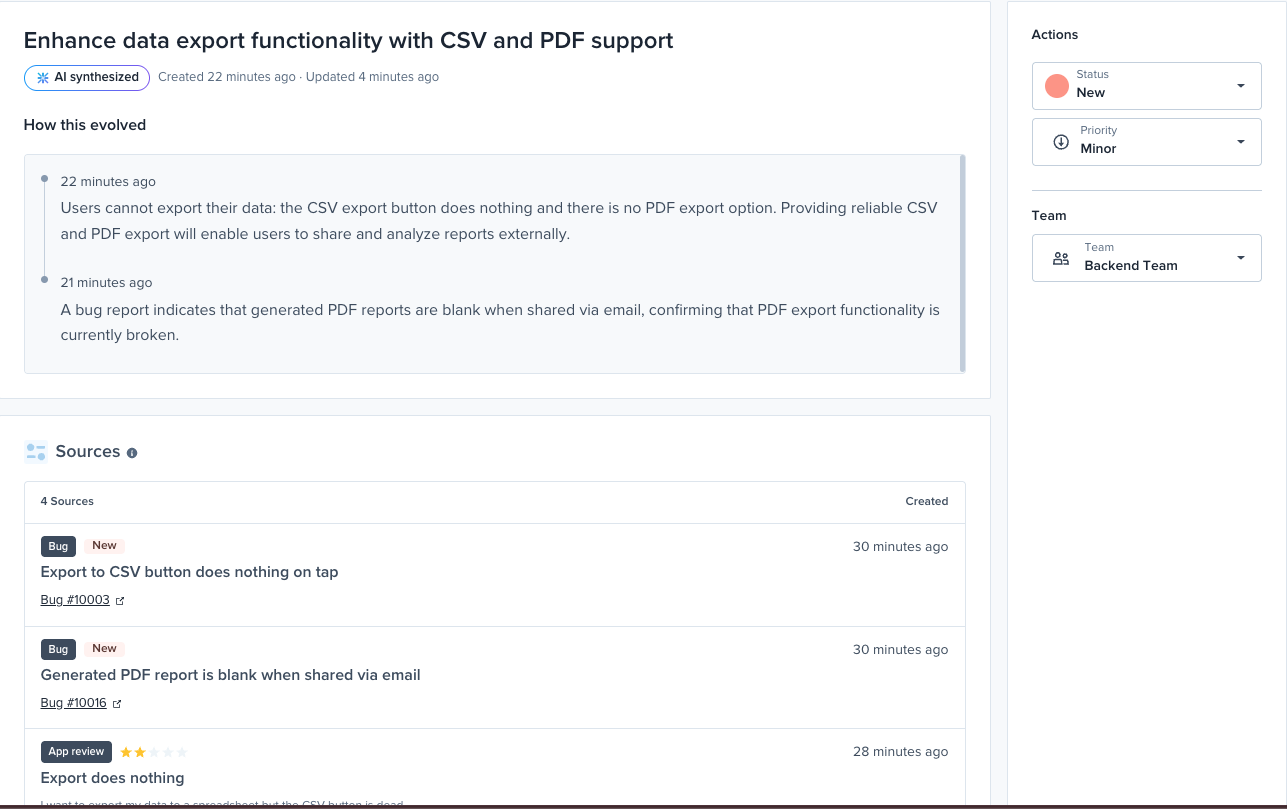
Click any Opportunity to open its detail view, where you can review the evidence behind it and manage it just like you manage a bug.
* **AI synthesized**: a badge marking that this Opportunity was generated by the AI, with the dates it was created and last updated.
* **How this evolved**: a timeline that shows how the theme built up over time as new bug reports, reviews, and survey responses reinforced it, so you can see the reasoning, not a black box.
* **Status**: move an Opportunity through **New → In Progress → Closed / Dismissed** as your team acts on it.
* **Priority**: adjust the suggested priority anywhere from **Trivial** to **Blocker**.
* **Team**: assign the Opportunity to a team for ownership and follow-up.
### Sources panel
The **Sources** panel lists every bug report, app store review, and survey response that drove the AI's reasoning for an Opportunity. Each source shows its type (**Bug**, **App review**, or **Survey**) along with its status and when it was created, and links directly to the original report or survey. This gives you full traceability: you can always trace an Opportunity back to the specific user feedback behind it.
{% hint style="info" %}
Opportunities are generated from **bug reports**, **app store reviews**, and **survey responses**. Support for **feature requests** is on the roadmap.
{% endhint %}
### Related
* [Inbox](/product-guides-and-integrations/product-guides/inbox.md): how Opportunities and the Issues List work together.
* [Issues List](/product-guides-and-integrations/product-guides/inbox/issues-list.md): what is broken, ranked by impact.
* From your AI client: the `list_opportunities` and `opportunity_details` tools in the [MCP Tools Reference](/product-guides-and-integrations/product-guides/ai-features/luciq-mcp-server/mcp-tools-reference.md). From the terminal: `luciq opportunities list` and `luciq opportunities show` in the [CLI Command Reference](/product-guides-and-integrations/product-guides/luciq-cli/command-reference.md).
---
# Agent Instructions
This documentation is published with GitBook. GitBook is the documentation platform designed so that both humans and AI agents can read, navigate, and reason over technical content effectively. Learn more at gitbook.com.
## Querying This Documentation
If you need additional information that is not directly available in this page, you can query the documentation by asking a question.
Perform an HTTP GET request on the following URL with the `ask` and `goal` query parameters:
```
GET https://docs.luciq.ai/product-guides-and-integrations/product-guides/inbox/opportunities.md?ask=&goal=
```
`ask` is the immediate question: it should be specific, self-contained, and written in natural language.
`goal` is what the user is ultimately trying to achieve, the reason they need the answer. Sharing it helps GitBook give you a better, more relevant answer. A goal is most helpful when it describes the outcome the user wants rather than restating the question. For example, with `ask=how do I create an API token`, a goal like `automate deployments from our CI pipeline` lets GitBook tailor the answer to that use case.
The response will contain a direct answer to the question and relevant excerpts and sources from the documentation.
Use this mechanism when the answer is not explicitly present in the current page, you need clarification or additional context, or you want to retrieve related documentation sections.