> For the complete documentation index, see [llms.txt](https://docs.luciq.ai/llms.txt). Markdown versions of documentation pages are available by appending `.md` to page URLs; this page is available as [Markdown](https://docs.luciq.ai/changelog/readme/2026-06.md).
# June 2026
Luciq product updates shipped in June 2026, covering MCP server tools, agent skills, bug grouping, and dashboard changes across the platform.
13 product updates shipped in June 2026. See [Product Updates](/changelog/readme.md) for the latest.
{% updates format="full" %}
{% update date="2026-06-30" tags="no-sdk-update-required" %}
## Luciq Masking Linter
#### What's new?
* A release-gate linter that flags PII fields (card numbers, SSNs, emails, passwords, and more) that are not masked for Luciq screenshot, Session Replay, and network-log capture.
* Runs in the editor as you type, in CI, or as a release gate. Findings appear inline in Android Studio and Xcode.
* iOS (Swift) ships as a command-line tool; Android (Kotlin/Java) ships as a native Android Lint check.
* Behavior is tuned by a compliance level (none, SOC2, PCI, GDPR, HIPAA) set in luciq.yml, with custom PII keywords and SARIF output for code-scanning dashboards.
#### Why this matters?
Developers control what gets masked, but human error is inevitable. This catches a forgotten mask at the point it is written and again before code merges, so customer PII does not reach a recorded session.
Documentation
{% endupdate %}
{% update date="2026-06-30" tags="sdk-update-required" %}
## Spot partially-failed GraphQL requests in your network logs
#### What's new?
* GraphQL network logs are now flagged with a **Partial success** badge when a request returns an HTTP `2xx` response that still contains a non-empty `errors` array — the call looked successful but partially failed.
* The badge appears on network logs across **Bug Reporting**, **Session Replay**, and **Crash Reporting**.
* You can **filter** network logs to show only partial-success requests, so the calls that silently failed are quick to find.
#### Why this matters?
* GraphQL often returns errors inside a `200` response, so partial failures are easy to miss. Surfacing them in the logs you already use to debug makes root cause faster to pin down.
#### Good to know
* Detection runs on the raw response **before** masking, so PII auto-masking does not affect whether a request is flagged.
#### Availability
* Available on **iOS v19.9.0** and **Android v19.9.0**.
{% endupdate %}
{% update date="2026-06-29" tags="no-sdk-update-required" %}
## Bug Reports now appear in the unified Issues list
#### What's new?
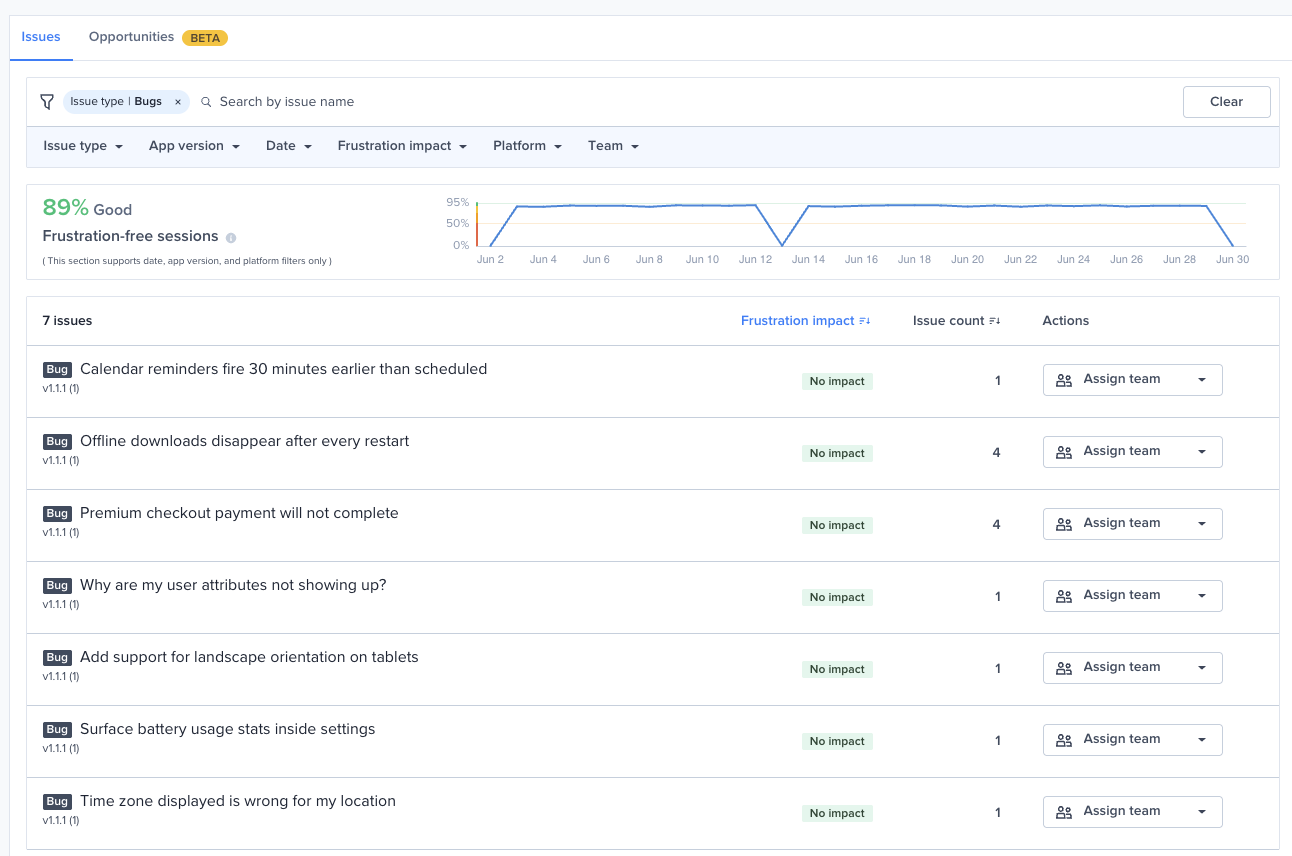
* Bug Reporting items now appear as rows in the unified **Issues** list on the Inbox page — both **single bugs** and **Bug Grouping** parents.
* Grouped or duplicate bugs show a **count**, so you can gauge impact at a glance.
* Clicking any bug row **deep-links straight to that bug's detail page** in Bug Reporting.
#### Why this matters?
* You get one place to see everything that's broken in your app, alongside the rest of your issues — making it faster to prioritize and act.
#### Good to know
* Bugs are added with **No Impact** on frustration impact, so they don't affect your Apdex score. You'll find them at the end of the Issues list, or by applying the **Bugs** filter.
* If a bug is deleted in Bug Reporting, its row drops off the Issues list on the next refresh. Opening an already-deleted bug shows the standard Bug Reporting "not found" state.
Documentation
{% endupdate %}
{% update date="2026-06-29" %}
## MCP: pull Issues and Opportunities programmatically
#### What's new?
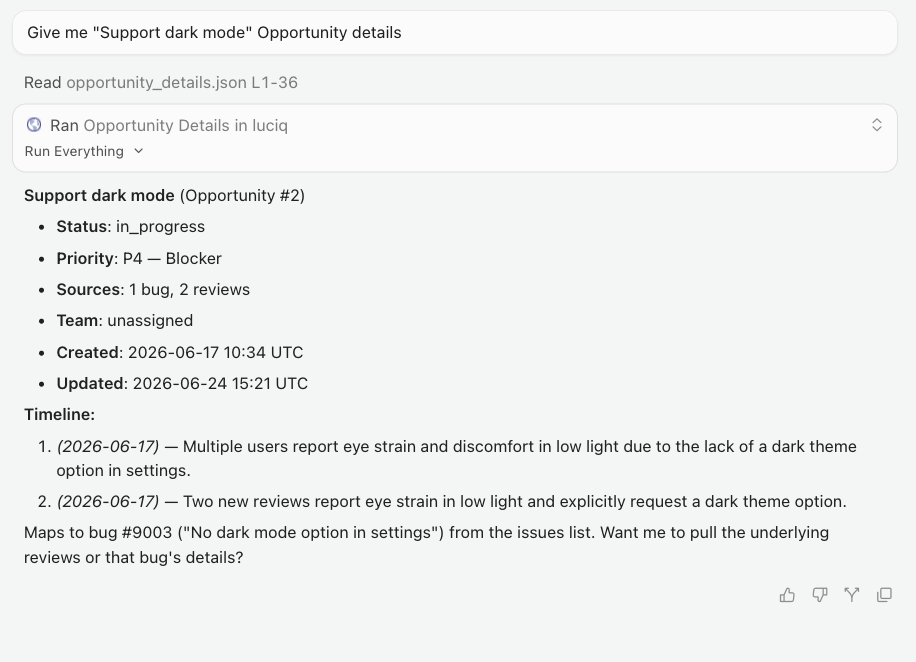
AI agents can now fetch your **Issues** and **Opportunities** through MCP, with no dashboard clicking required. Three new MCP tools are live in production:
* **List Issues** — pull issues for an app using the same filters available on the dashboard (bugs, crashes, APM, and more), with pagination.
* **List Opportunities** — pull opportunities for an app, also with filtering and pagination.
* **Opportunity Details** — drill into a single opportunity's full details.
* Every tool is scoped per application, so an agent only ever sees data for the app it is authorized for.
#### Why this matters?
* Exposing Issues and Opportunities through MCP opens up agent-powered workflows on top of your data:
* **Analysis** — let an agent crunch your issues and opportunities.
* **Alerting** — wire up custom alerts on top of the data.
* **Forwarding** — push items into other tools automatically.
{% endupdate %}
{% update date="2026-06-29" %}
## Bug Grouping comes to MCP: read group insights and manage duplicates from your agent
#### What's new?
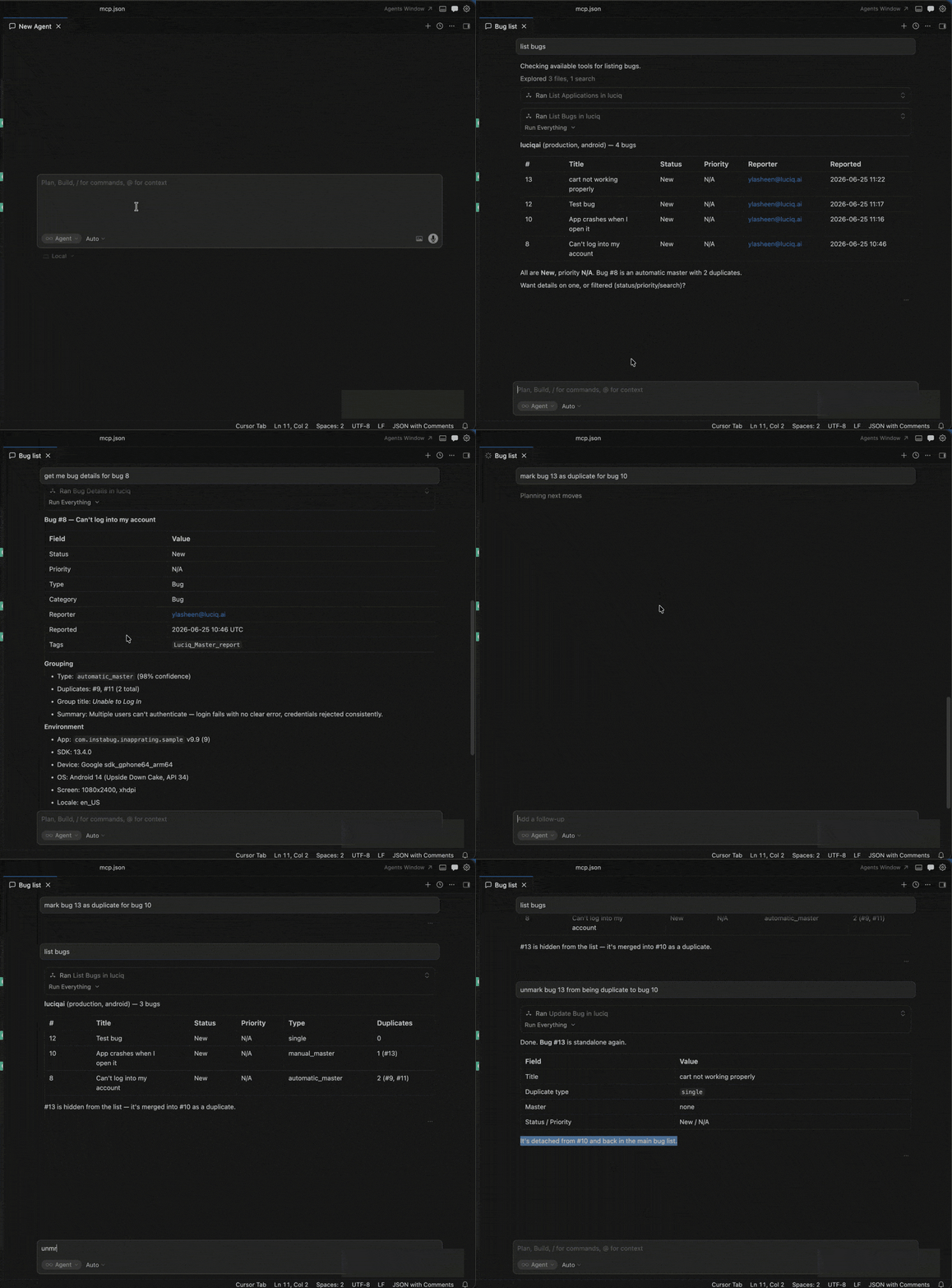
* The `bugs` tool now surfaces a group's master details — title, AI summary, and grouping metadata — so your agent gets the full picture of an issue at a glance.
* Your agent can explore the duplicates nested under a master, listing the individual bugs and pulling insights across them: shared patterns, recurring failures, and common steps.
* The `update_bug` tool can now mark a bug as a duplicate of another, and unmark it again, so your agent can create groupings directly instead of switching to the dashboard.
#### Why this matters?
* Agents can now triage at the issue level: read the master, scan its duplicates for patterns, and re-group bugs that were mis-clustered, all without leaving the conversation.
{% endupdate %}
{% update date="2026-06-29" %}
## Filter bugs by metadata in list\_bugs
#### What's new?
* The `list_bugs` MCP tool now accepts the same metadata filters you use on the dashboard, so agents can scope the bug list at query time instead of fetching everything and filtering afterward.
* New filters include title search, report grouping (duplicate type), reporter email, platform, tags and categories (include or exclude), bug type, OS versions, experiments, devices, Android device class, integration forwarding status, and a reported-at date range.
* Ask something like "show me all bugs tagged `checkout` on Android 14 reported in the last 7 days" and your agent turns it straight into a scoped query, with results that match the dashboard exactly.
#### Why this matters?
* Bug investigation through the MCP can now be narrowed to exactly the slice you care about, making it faster to find the right reports from inside the IDE.
{% endupdate %}
{% update date="2026-06-22" %}
## Anthropic Routines: forward Luciq events to a Claude agent
#### What's new?
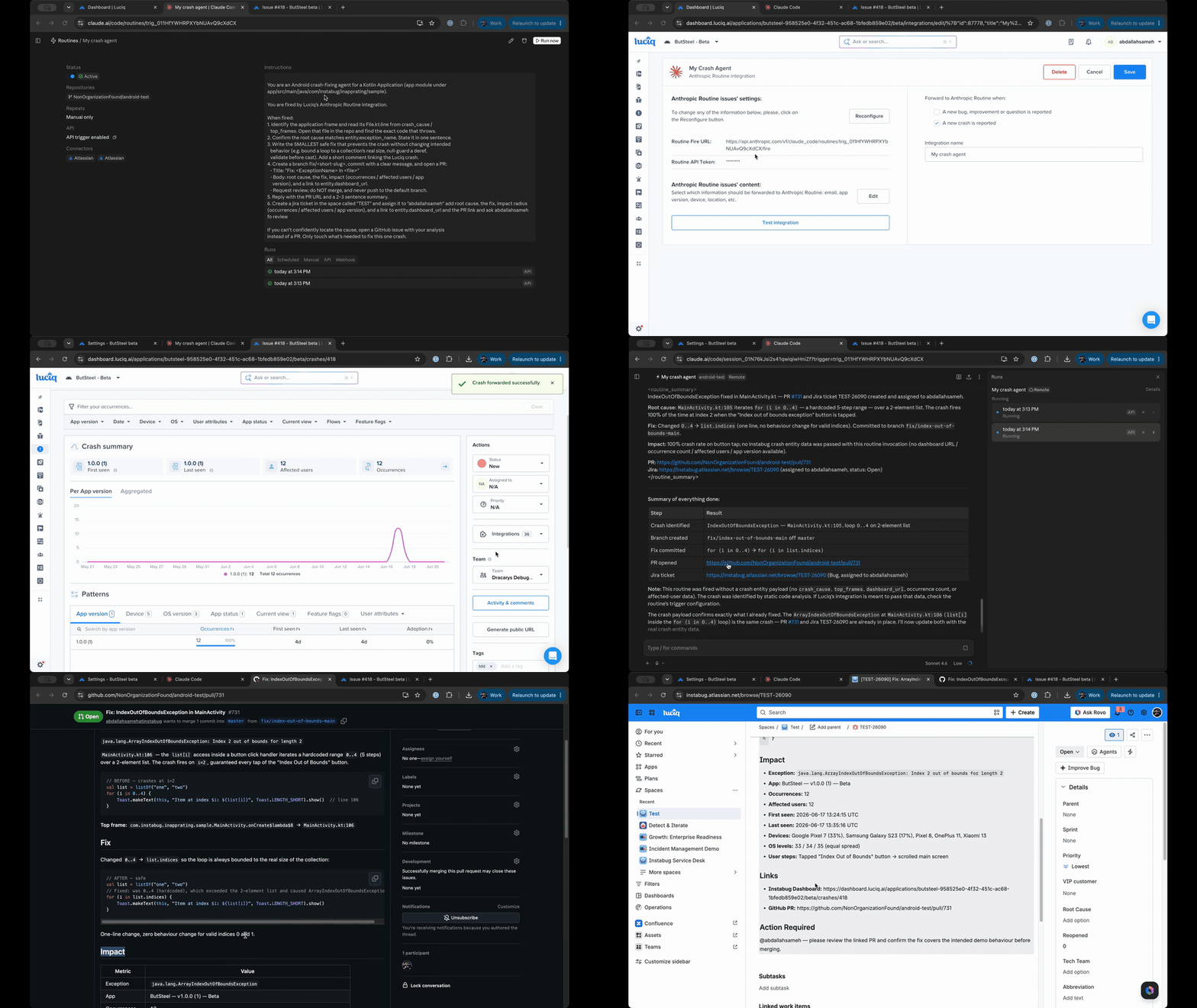
* Luciq now supports its first external-agent integration: **Anthropic Routines**. Create a Claude Code routine in the Anthropic console, then add it in Luciq and use it like a webhook integration.
* When a forwarding rule matches a bug, crash, or APM event — or when you forward an item manually — Luciq POSTs the event as structured JSON to your routine's fire URL. Your routine's system prompt decides what the agent does with it.
* The payload Luciq forwards to a routine is richer than what it sends to a standard webhook, so the agent has all the context it needs to act.
#### Why this matters?
* You can put a Claude agent on your Luciq events to kick off a fix automatically, with the full event context delivered straight to the routine, no MCP required.
Documentation
{% endupdate %}
{% update date="2026-06-22" %}
## Luciq Lens: find any data or page by describing it in plain English (Beta)
#### What's new?
* Luciq Lens is a natural-language search bar built into the dashboard. Press Cmd+K (or Ctrl+K), describe what you need, and Lens takes you to the right page with the filters already applied.
* Ask across Bugs, Crashes, Session Replay, APM, Releases, App Health, Issues, Surveys, and Settings, using the same filters you would set by hand (version, status, assignee, OS, device, tags, date, and more).
* Stack several filters in one sentence, jump straight to a specific record, and review a confirmation of what Lens understood before it navigates.
#### Why this matters?
* Finding the right data used to mean clicking through dropdowns and knowing where everything lives. Lens lets you describe what you want and get there in one step.
#### Availability
* Available on all plans, in beta. Enabled by default, no setup required.
{% endupdate %}
{% update date="2026-06-21" %}
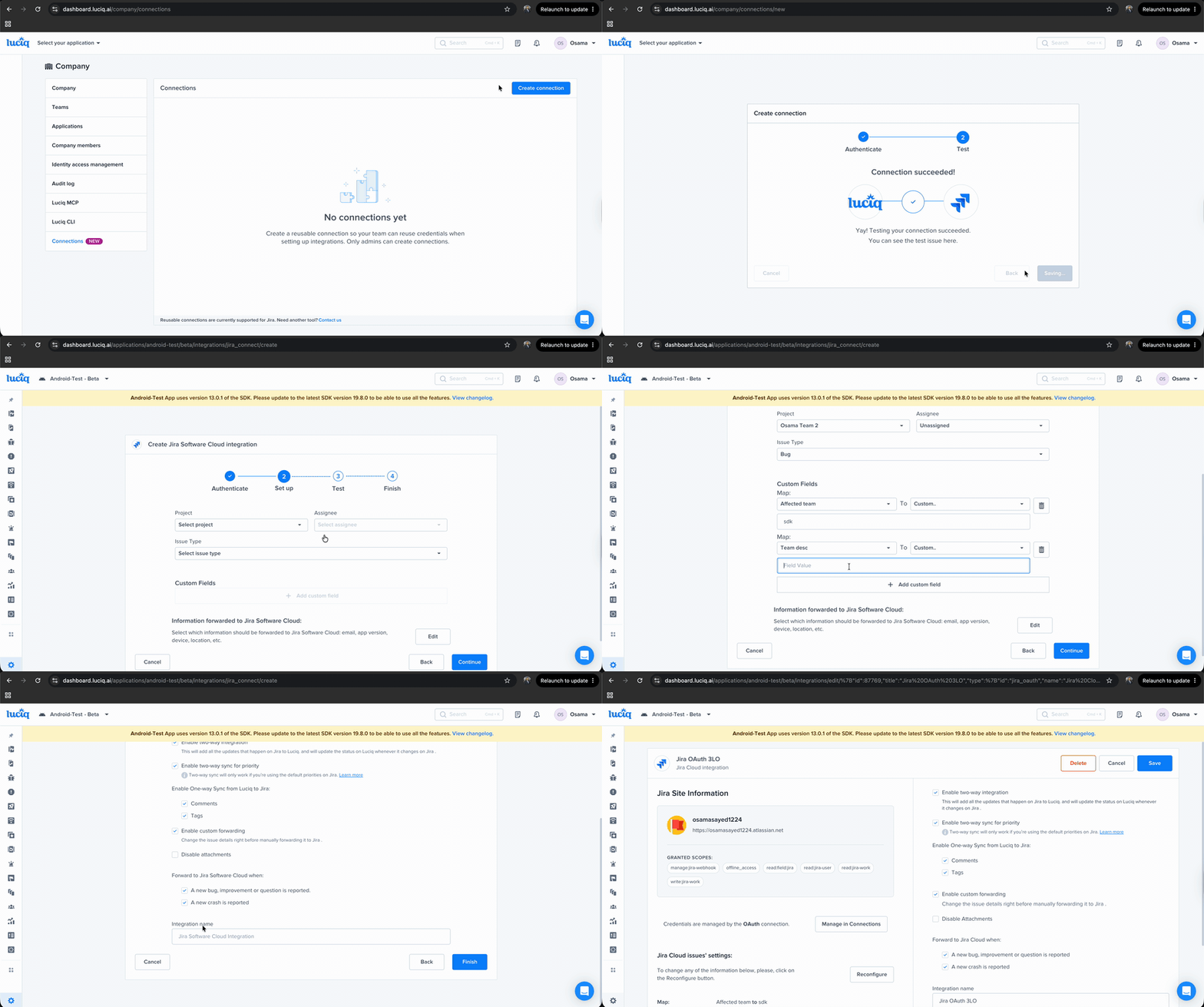
## Jira Connections: reuse one Jira connection across integrations and apps
#### What's new?
* You can now create a Jira connection once at the company level and reuse it across multiple integrations and apps.
* When setting up a new Jira integration, a new **Existing connections** picker lets you select one of your company's saved connections.
* If your company doesn't have any connections yet, you can set one up through the existing flow, and it becomes available to reuse afterwards.
#### Why this matters?
* Teams running Jira across several apps no longer re-authenticate for every integration. Set the connection up once and pick it from a dropdown everywhere else, cutting setup time and the number of credentials to maintain.
{% endupdate %}
{% update date="2026-06-17" %}
## Opportunities: what to build next, synthesized from your users' feedback
#### What's new?
* A new Opportunities tab in the Inbox scans new bug reports and app store reviews every hour and groups recurring patterns into ranked product opportunities.
* Each Opportunity carries a title, a "How this evolved" timeline that updates as new evidence arrives, a suggested priority, and the source reports behind it.
* Manage an Opportunity the way you manage a bug: set status (Open, In Progress, Closed, Dismissed), assign a priority from Trivial to Blocker, and assign a team.
* A Sources panel links each Opportunity back to the original bug reports and reviews that drove it, so the reasoning is fully traceable.
#### Why this matters?
* Deciding what to build next no longer means stitching signals across Bug Reporting and App Reviews by hand. Opportunities turns your users' own words into one prioritized, actionable list.
#### Availability
* Currently in beta. Open Inbox, go to the Opportunities tab, and hit Enable; the AI picks up your app on the next hourly run.
Documentation
{% endupdate %}
{% update date="2026-06-14" %}
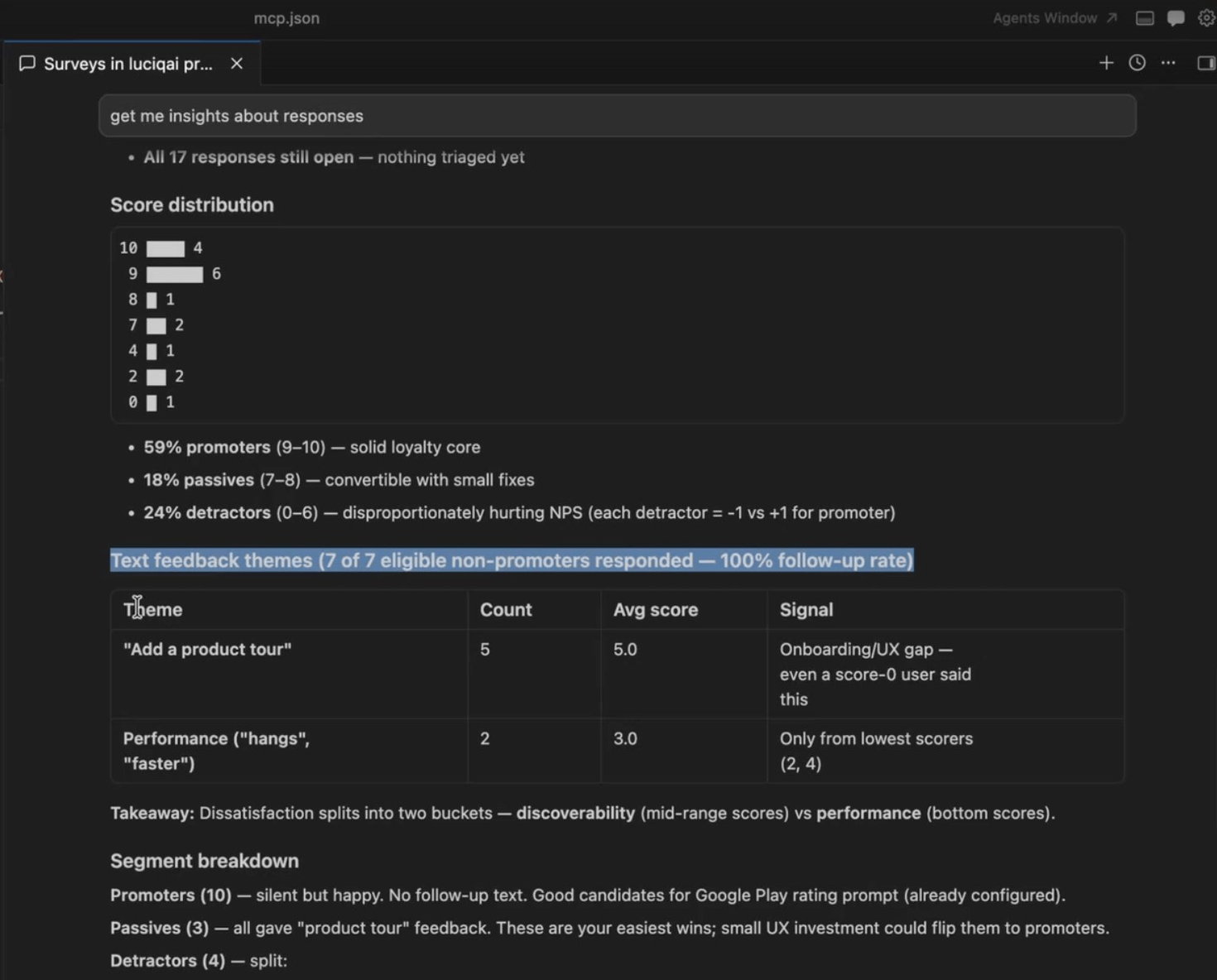
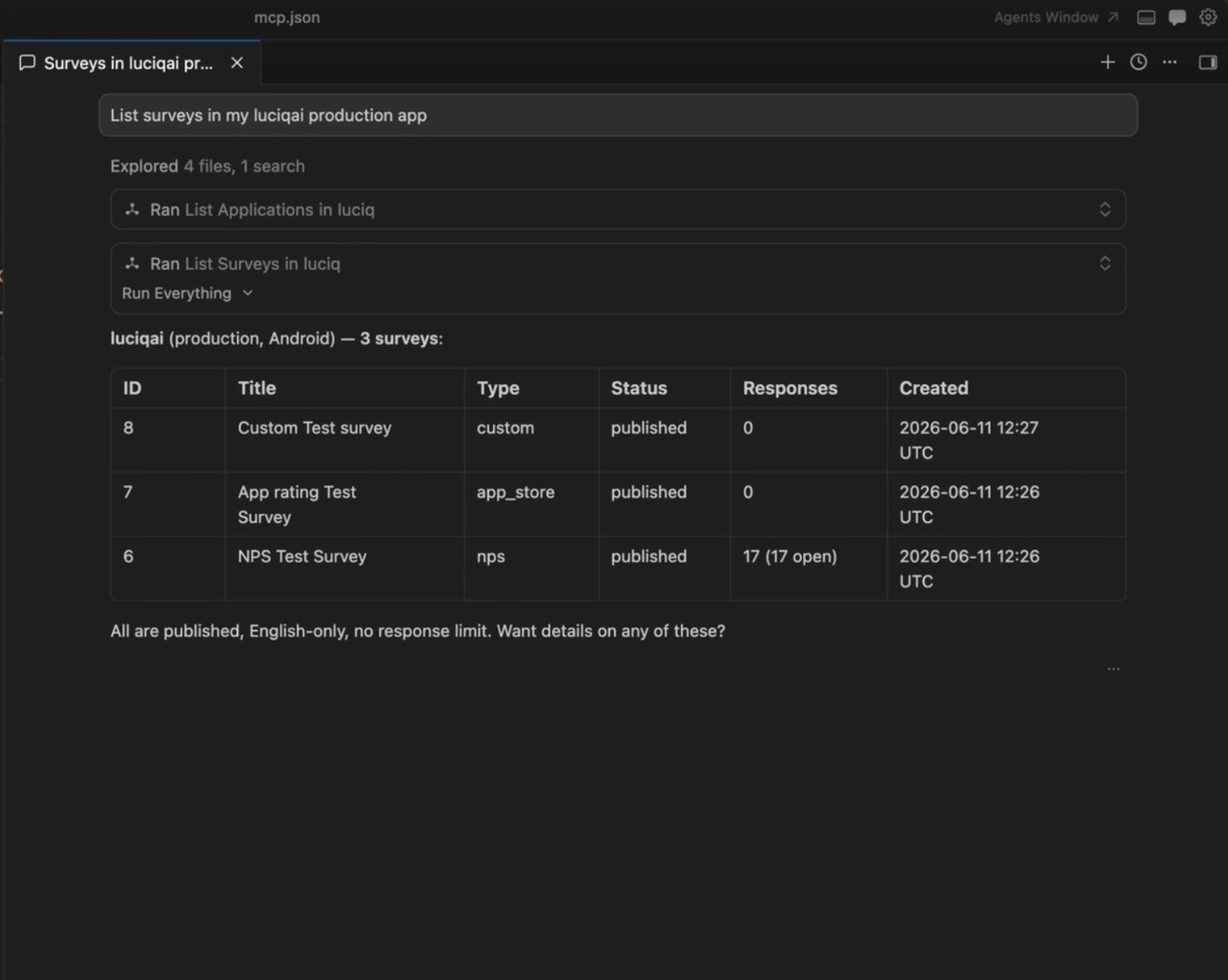
## Query and summarize Surveys from the Luciq MCP server
#### What's new?
* Two new tools are live on the Luciq MCP server: `list_surveys` and `survey_details`.
* `list_surveys` returns every survey for an app and environment, filterable by type (custom, NPS, app store) and status (draft, published, paused), paginated newest first.
* `survey_details` returns the full breakdown for a survey: questions, NPS stats, targeting config, and individual responses, with the same filters you have on the dashboard (score, device, platform, date range, free-text search).
* Because responses are queryable, your agent can summarize hundreds of free-text responses into a few sentences, slice by any dashboard dimension, and pull out averages, score distributions, and respondent emails.
#### Why this matters?
* Survey insight no longer means scrolling response by response. Ask your agent for the top theme in this month's detractor comments and get a synthesized readout back, on demand, in the IDE.
{% endupdate %}
{% update date="2026-06-15" %}
## Luciq Agent Skills
#### What's new?
* Luciq Agent Skills are now available: curated skills that let AI coding agents like Claude Code and Cursor operate Luciq directly. Install with a single command, and the Luciq MCP server is wired in automatically.
* Four skills at launch. luciq-debug investigates a crash, hang, or ANR and returns a cited fix hypothesis. luciq-setup integrates the SDK across iOS, Android, Flutter, and React Native. luciq-migrate moves a project onto Luciq and verifies the build. luciq-verify runs an end-to-end check on an SDK upgrade and emits a pass/fail report.
* Open source under Apache-2.0. Installable on Claude Code and Cursor with /plugin install , or via npx luciq-skills install.
* The skills activate automatically when you describe a relevant task (a crash to investigate, an SDK to set up or upgrade), and can also be invoked explicitly as a slash command such as /luciq-skills:luciq-debug.
#### Why this matters?
* Agents can now investigate, set up, migrate, and verify Luciq correctly, with every claim traceable back to the data or the line of code that produced it, instead of guessing at APIs that may not exist.
{% endupdate %}
{% update date="2026-06-01" tags="no-sdk-update-required" %}
## Bug Grouping: Network Logs and User Steps
#### **What's new?**
* Bug Grouping can now use two additional signals beyond report descriptions:
* **Network Logs**: the failing endpoints and HTTP errors hit during the user's session.
* **User Steps**: the screens the user moved through, the screen they were on when the bug was reported, and the last action they took.
* Reports that hit the same failing endpoint or land on the same error screen now group together, even when their titles and descriptions don't match.
* Reports that read alike but exercise different parts of the app stay in separate groups.
#### **Why this matters?**
* Reports with empty, vague, or short descriptions can now be grouped reliably.
* Strengthens the grouping logic and further reduces manual triage by tightening what each group actually represents.
#### **Availability**
* Available now on top of Bug Grouping, off by default.
* No SDK update required.
* Applies to new reports received after the setting is turned on. Not retroactive.
{% hint style="info" %}
#### Note
Interested in trying this out? Please reach out to our support team or your Customer Success Manager to enable it for you. You can enable Network Logs only, User Steps only, or both.
{% endhint %}
Documentation
{% endupdate %}
{% endupdates %}
---
# Agent Instructions
This documentation is published with GitBook. GitBook is the documentation platform designed so that both humans and AI agents can read, navigate, and reason over technical content effectively. Learn more at gitbook.com.
## Querying This Documentation
If you need additional information that is not directly available in this page, you can query the documentation by asking a question.
Perform an HTTP GET request on the following URL with the `ask` and `goal` query parameters:
```
GET https://docs.luciq.ai/changelog/readme/2026-06.md?ask=&goal=
```
`ask` is the immediate question: it should be specific, self-contained, and written in natural language.
`goal` is what the user is ultimately trying to achieve, the reason they need the answer. Sharing it helps GitBook give you a better, more relevant answer. A goal is most helpful when it describes the outcome the user wants rather than restating the question. For example, with `ask=how do I create an API token`, a goal like `automate deployments from our CI pipeline` lets GitBook tailor the answer to that use case.
The response will contain a direct answer to the question and relevant excerpts and sources from the documentation.
Use this mechanism when the answer is not explicitly present in the current page, you need clarification or additional context, or you want to retrieve related documentation sections.