> For the complete documentation index, see [llms.txt](https://docs.luciq.ai/llms.txt). Markdown versions of documentation pages are available by appending `.md` to page URLs; this page is available as [Markdown](https://docs.luciq.ai/product-guides-and-integrations/product-guides/luciq-cli.md).
# Luciq CLI
The Luciq CLI brings production data to your terminal. Upload symbol files and query crashes, bugs, APM, reviews, and alerts as JSON.
### Your production data, in your terminal.
The **Luciq CLI** (`luciq`) brings Luciq to the command line. Upload symbol files for crash symbolication, and query or manage your apps' data — crashes, bugs, performance metrics, reviews, surveys, issues, opportunities, alerts, and incidents — without opening the dashboard.
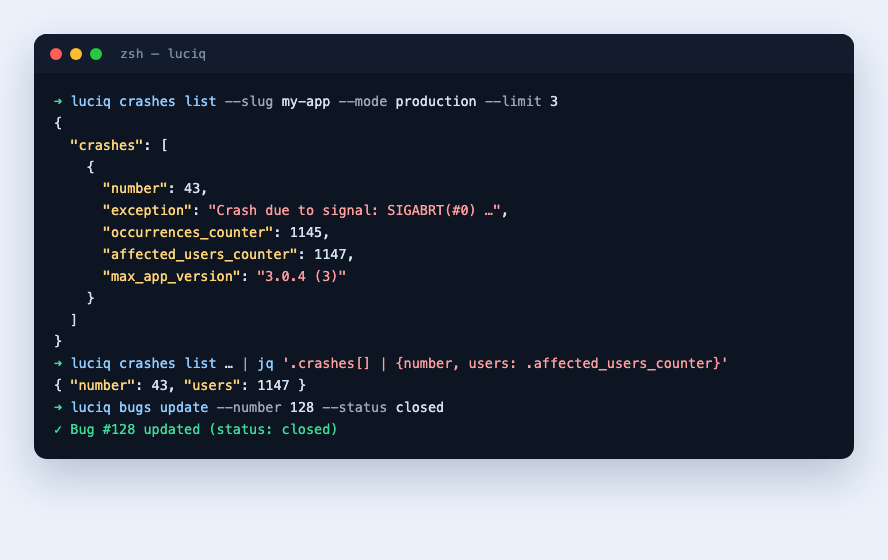
Every data command prints pretty-printed JSON, so the output pipes cleanly into `jq`, shell scripts, cron jobs, and CI workflows:
```bash
luciq crashes list --slug my-app --mode production --status open --limit 5 \
| jq '.[] | {number, title, occurrences_counter}'
```
{% hint style="info" %}
The CLI's data commands run the same tools that power the [Luciq MCP Server](/product-guides-and-integrations/product-guides/ai-features/luciq-mcp-server.md), with the same role-based permissions. If you prefer natural-language access from your IDE or AI assistant, use the MCP Server; if you want deterministic commands for scripts and automation, use the CLI.
{% endhint %}
***
### What can you do with it?
* **Upload symbol files.** iOS dSYMs, Android ProGuard/R8 mapping files, NDK `.so` files, React Native source maps, and Flutter Dart symbols — one tool for every platform, ideal for CI pipelines.
* **Query production data.** Crashes, app hangs, bug reports, APM metrics, app store reviews, surveys, aggregated app-health insights, and the unified Issues & Opportunities surface.
* **Manage your workspace.** Triage bugs, create and update alert rules, resolve triggered alerts, and manage APM funnels.
***
### Commands at a Glance
| Command | What it covers |
| --------------------- | ---------------------------------------------------------------------- |
| `luciq login` | Authenticate with your CLI token |
| `luciq upload` | Upload symbol files for iOS, Android, React Native, and Flutter |
| `luciq apps` | List the applications you can access |
| `luciq crashes` | Query crashes, app hangs, patterns, diagnostics, and occurrences |
| `luciq bugs` | Query and triage user-reported bugs |
| `luciq apm` | Query APM metrics (network, launch, flows, screens) and manage funnels |
| `luciq reviews` | Query app store reviews and ratings |
| `luciq surveys` | Query surveys and their responses |
| `luciq insights` | Aggregated app-health snapshot for one app |
| `luciq issues` | Unified issues across crashes, APM, AI-detected issues, and bugs |
| `luciq opportunities` | Prioritized product opportunities |
| `luciq alerts` | Manage alert rules |
| `luciq incidents` | Manage triggered alerts — list, inspect, resolve, reopen |
***
### Get Started
**New to the CLI?** Start with the [Getting Started](/product-guides-and-integrations/product-guides/luciq-cli/getting-started.md) guide — install, authenticate, and run your first command in a couple of minutes.
**Shipping a release?** Jump to [Uploading Symbol Files](/product-guides-and-integrations/product-guides/luciq-cli/uploading-symbol-files.md) to wire symbol uploads into your build pipeline.
***
### Explore
* [**Getting Started**](/product-guides-and-integrations/product-guides/luciq-cli/getting-started.md) — Installation, authentication, and configuration
* [**Uploading Symbol Files**](/product-guides-and-integrations/product-guides/luciq-cli/uploading-symbol-files.md) — dSYMs, mappings, NDK, source maps, and Dart symbols
* [**Command Reference**](/product-guides-and-integrations/product-guides/luciq-cli/command-reference.md) — Every data command with its options and examples
---
# Agent Instructions
This documentation is published with GitBook. GitBook is the documentation platform designed so that both humans and AI agents can read, navigate, and reason over technical content effectively. Learn more at gitbook.com.
## Querying This Documentation
If you need additional information that is not directly available in this page, you can query the documentation by asking a question.
Perform an HTTP GET request on the following URL with the `ask` and `goal` query parameters:
```
GET https://docs.luciq.ai/product-guides-and-integrations/product-guides/luciq-cli.md?ask=&goal=
```
`ask` is the immediate question: it should be specific, self-contained, and written in natural language.
`goal` is what the user is ultimately trying to achieve, the reason they need the answer. Sharing it helps GitBook give you a better, more relevant answer. A goal is most helpful when it describes the outcome the user wants rather than restating the question. For example, with `ask=how do I create an API token`, a goal like `automate deployments from our CI pipeline` lets GitBook tailor the answer to that use case.
The response will contain a direct answer to the question and relevant excerpts and sources from the documentation.
Use this mechanism when the answer is not explicitly present in the current page, you need clarification or additional context, or you want to retrieve related documentation sections.