> For the complete documentation index, see [llms.txt](https://docs.luciq.ai/llms.txt). Markdown versions of documentation pages are available by appending `.md` to page URLs; this page is available as [Markdown](https://docs.luciq.ai/product-guides-and-integrations/product-guides/inbox/issues-list/frustration-impact.md).
# Frustration Impact
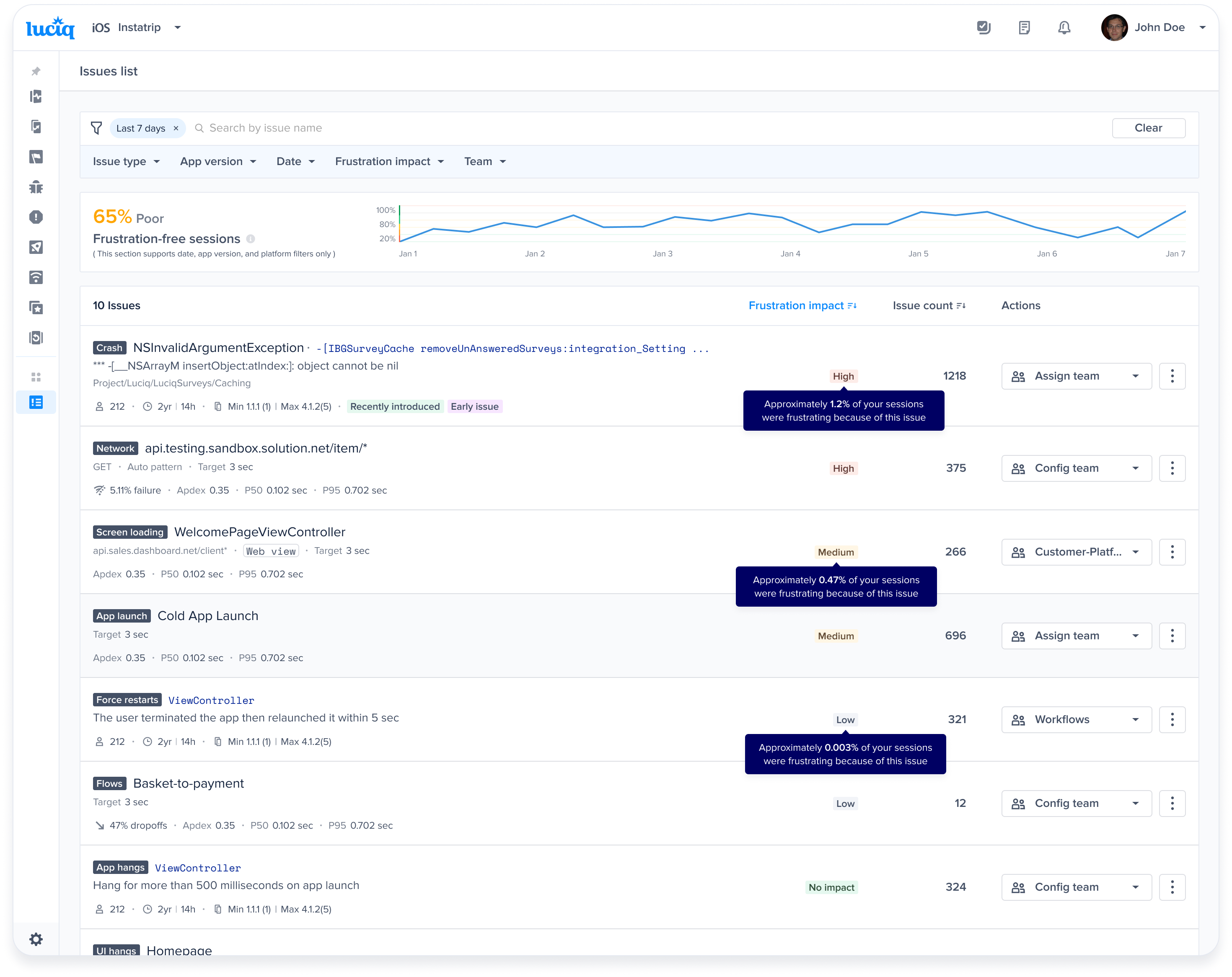
Frustration Impact shows how much an issue contributes to frustrating sessions, driving both your score and where the issue ranks.
### What is Frustration Impact?
Frustration Impact helps you understand how much each issue in your app contributes to frustrating sessions, affecting both your **Frustration score** and **issue prioritization**. This calculation ensures that the issues causing the most user frustration are ranked higher in the **Issues List**, helping you focus on what matters most.
***
### Frustration Impact Levels
To better understand the significance of each issue based on its Frustration Impact, issues are classified into the following categories:
* **High Impact:** Issues affecting ≥0.5% of total sessions. These are critical and require immediate attention.
* **Medium Impact:** Issues affecting between 0.01% and 0.5% of sessions. These should be addressed after high-impact issues.
* **Low Impact:** Issues affecting <0.01% of sessions. These have minimal impact but may still need resolution over time.
* **No Impact:** Issues that don’t affect your frustration-free sessions score, including:
* APM groups where all occurrences are satisfying (Frustration-Free Sessions 1).
* Metrics marked as non-key by your team.
***
### How is Frustration Impact Calculated?
The Frustration Impact of an issue reflects its effect on your app's frustration-free sessions by estimating the **percentage of frustrating or tolerable sessions it causes.**
#### For performance issues:
**Example 1: Cold App Launch**
We approximate the percentage of sessions that were **frustrating** or **tolerable** due to the **cold app launch**. We calculate this by considering how bad the **cold app launch** is within all app launches, and **how much app launches contribute to frustrating and tolerable sessions** in total.
Where:
**Example 2: Network Requests**
We approximate the percentage of sessions that were **frustrating** or **tolerable** due to this particular **network request**. We calculate this by considering **how bad the network request is** within all networks, and **how much networks are contributing to frustrating and tolerable sessions** in total.
Where:
**Example 3: App Hangs**
Where:
**Notes:**
* This calculation applies to **app launch**, **networks**, **screen loading**, **flows**, **UI hangs**, **app hangs**, and **force restarts**.
* When calculating **Frustrating/Tolerable Sessions Caused by an issue, tolerable sessions** are given **half the weight** compared to **frustrating sessions**.
* **Dissat count** = (number of frustrating occurrences) + 0.5 \* (number of tolerable occurrences)
#### For Crashes:
A crash occurrence disrupts the user session completely. So we simply calculate the percentage of sessions this crash impacted.
**Notes:**
* This calculation applies to fatal crashes, ANRs for Android, and OOMs for iOS.
---
# Agent Instructions
This documentation is published with GitBook. GitBook is the documentation platform designed so that both humans and AI agents can read, navigate, and reason over technical content effectively. Learn more at gitbook.com.
## Querying This Documentation
If you need additional information that is not directly available in this page, you can query the documentation dynamically by asking a question.
Perform an HTTP GET request on the current page URL with the `ask` query parameter, and the optional `goal` query parameter:
```
GET https://docs.luciq.ai/product-guides-and-integrations/product-guides/inbox/issues-list/frustration-impact.md?ask=&goal=
```
`ask` is the immediate question: it should be specific, self-contained, and written in natural language.
`goal` is optional and describes the broader end goal you are ultimately trying to accomplish on behalf of the user. GitBook uses it to tailor the answer towards what is most useful for that goal.
The response will contain a direct answer to the question and relevant excerpts and sources from the documentation.
Use this mechanism when the answer is not explicitly present in the current page, you need clarification or additional context, or you want to retrieve related documentation sections.