> For the complete documentation index, see [llms.txt](https://docs.luciq.ai/llms.txt). Markdown versions of documentation pages are available by appending `.md` to page URLs; this page is available as [Markdown](https://docs.luciq.ai/product-guides-and-integrations/product-guides/getting-started-with-luciq/frustration-free-sessions/how-to-configure-frustration-free-sessions.md).
# How to Configure Frustration-free Sessions
Set how sensitive your frustration-free sessions score is to each issue type and what each type costs in your Inbox, from the Issue impact page.
**Settings → Issue impact** holds two separate settings for each issue type:
* **Frustration sensitivity**: how easily an issue type makes a session frustrating. It feeds your frustration-free sessions score and [frustration impact](/product-guides-and-integrations/product-guides/inbox/issues-list/frustration-impact.md) in the Inbox. Changes apply to new sessions.
* **Cost impact** (coming soon): how much of a session's value an issue type takes away when it occurs in a session. It feeds each issue's impact in your Inbox and how it ranks. Changes apply right away.
Every value starts at Luciq's recommendation. Change only the ones that matter differently to you.
### Frustration Sensitivity
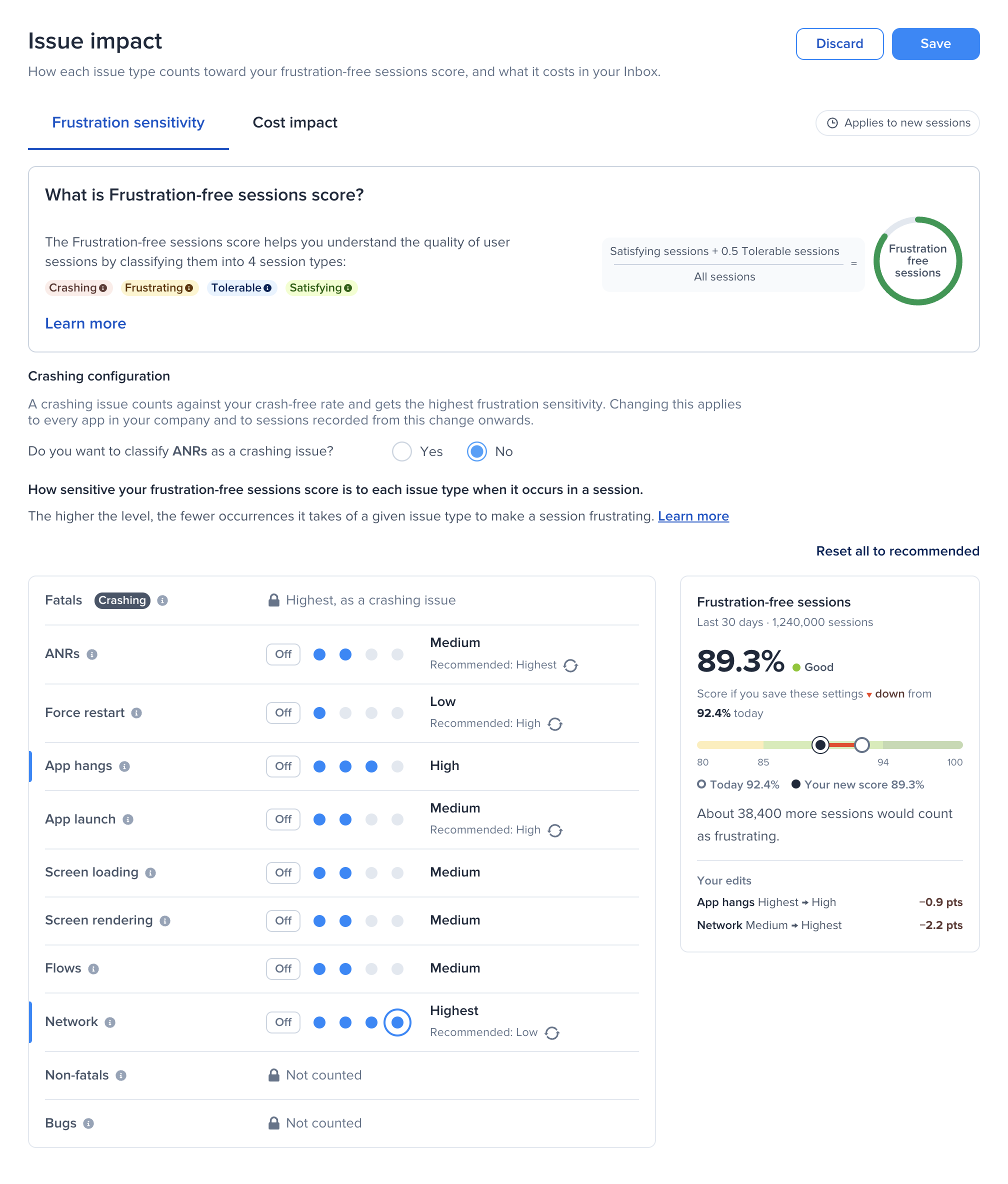
Each session is weighed: what went fine on one side, what went wrong on the other. A session counts as **frustrating** when what went wrong weighs at least 30% of everything that happened in it. The sensitivity level sets how much one occurrence of an issue type weighs:
| Level | One occurrence weighs about as much as |
| ----------- | ----------------------------------------------- |
| **Highest** | More than a typical session holds |
| **High** | An app launch |
| **Medium** | A screen load |
| **Low** | A network call |
| **Off** | Nothing: the issue type never affects the score |
So the higher the level, the fewer occurrences it takes of a given issue type to make a session frustrating. The level also weighs the occurrences that went fine, so for app launch, screen loading, screen rendering, flows, and network, one occurrence that went wrong next to three that went fine is not enough on its own, even at **Highest**. In a short session with little else going on, one occurrence can be enough at any level above Off. For a worked example, see [How are sessions categorized](/product-guides-and-integrations/product-guides/getting-started-with-luciq/frustration-free-sessions.md#how-are-sessions-categorized).
To change a level:
1. Go to **Settings → Issue impact**.
2. Pick a level for an issue type: **Off**, then four dots from **Low** to **Highest**. A level that differs from Luciq's shows **Recommended** with a reset button next to it.
3. The panel on the right shows what your frustration-free sessions score would be if you save, next to today's score over the last 30 days. It also shows how many more or fewer sessions would count as frustrating, and how many points each of your edits moves the score.
4. Select **Save**, review your changes, and confirm.
Your score changes for sessions recorded from this change onwards. Past scores stay as they are.
{% hint style="info" %}
If a level was saved between two of today's five levels, it stays exactly as saved and shows as, for example, **Between medium and high**. Pick one of the five levels, or reset it to recommended.
{% endhint %}
Some issue types have a fixed level:
* **Fatals** always make a session crashing.
* **Non-fatals** and **Bugs** are never counted.
#### Crashing Configuration
You can choose whether **OOMs** (iOS) and **ANRs** (Android) count as crashing. A crashing issue counts against your crash-free rate and always makes a session crashing. This choice applies to every app in your company, and to sessions recorded from this change onwards.
#### Recommended Levels
* **Fatals, OOMs, and ANRs**: Highest, since they completely disrupt the experience.
* **App hangs**: High, as they are highly noticeable.
* **Force restarts**: High, as they are a strong signal of user frustration.
* **App launch**: High, since it is one of the most visible interactions and shapes app ratings.
* **Screen loading, screen rendering, and flows**: Medium, as they moderately affect a session.
* **Network**: Low, as calls happen very often in a session, sometimes in the background. A low level keeps them from outweighing everything else.
***
### Cost Impact
{% hint style="info" %}
Cost impact is coming soon. Until it's available on your account, this tab isn't shown and the Inbox ranks issues by frustration impact.
{% endhint %}
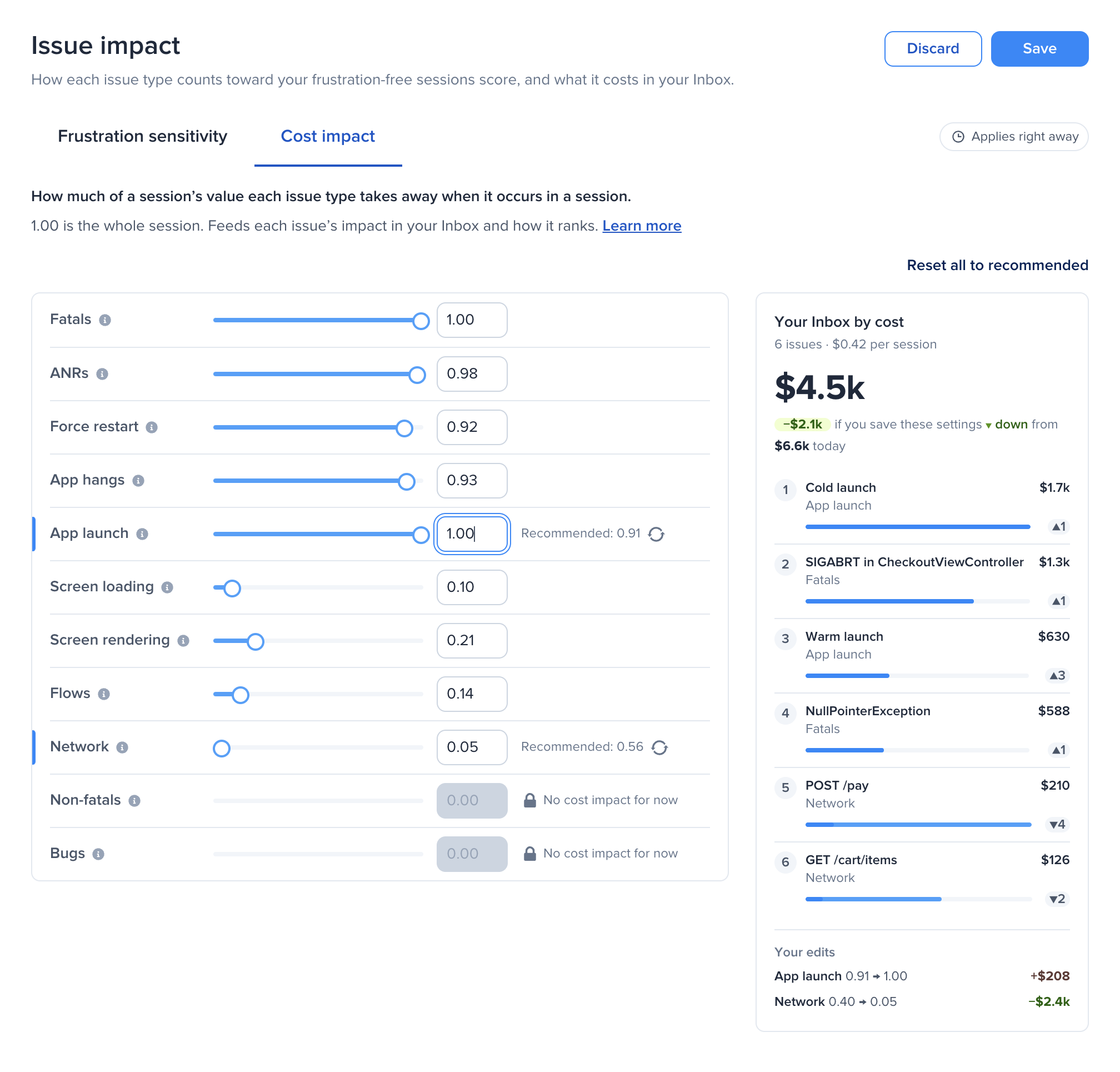
Each issue type has a cost from 0 to 1: how much of a session's value it takes away when it occurs in a session. **1.00** is the whole session, **0.30** about a third. Luciq's recommended costs come from how sessions with each issue type end.
In the Inbox, an issue's impact is its type's cost, times the sessions where the issue went wrong, adjusted for how critical it is to you. That impact decides where the issue ranks.
To change a cost:
1. Go to **Settings → Issue impact** and open **Cost impact**.
2. Drag the slider or type a number from 0 to 1. A custom cost shows **Recommended** with a reset button next to it.
3. The panel on the right shows what your Inbox's total would be if you save, next to today's total, and its top issues re-ranked as you change costs, with how far each one moves. It also shows how much each of your edits adds to or takes off the total.
4. Select **Save**, review your changes, and confirm.
Costs apply right away, to the whole Inbox.
{% hint style="info" %}
**Non-fatals** and **Bugs** have no cost impact for now.
{% endhint %}
***
### Control APM Traces in Your Score
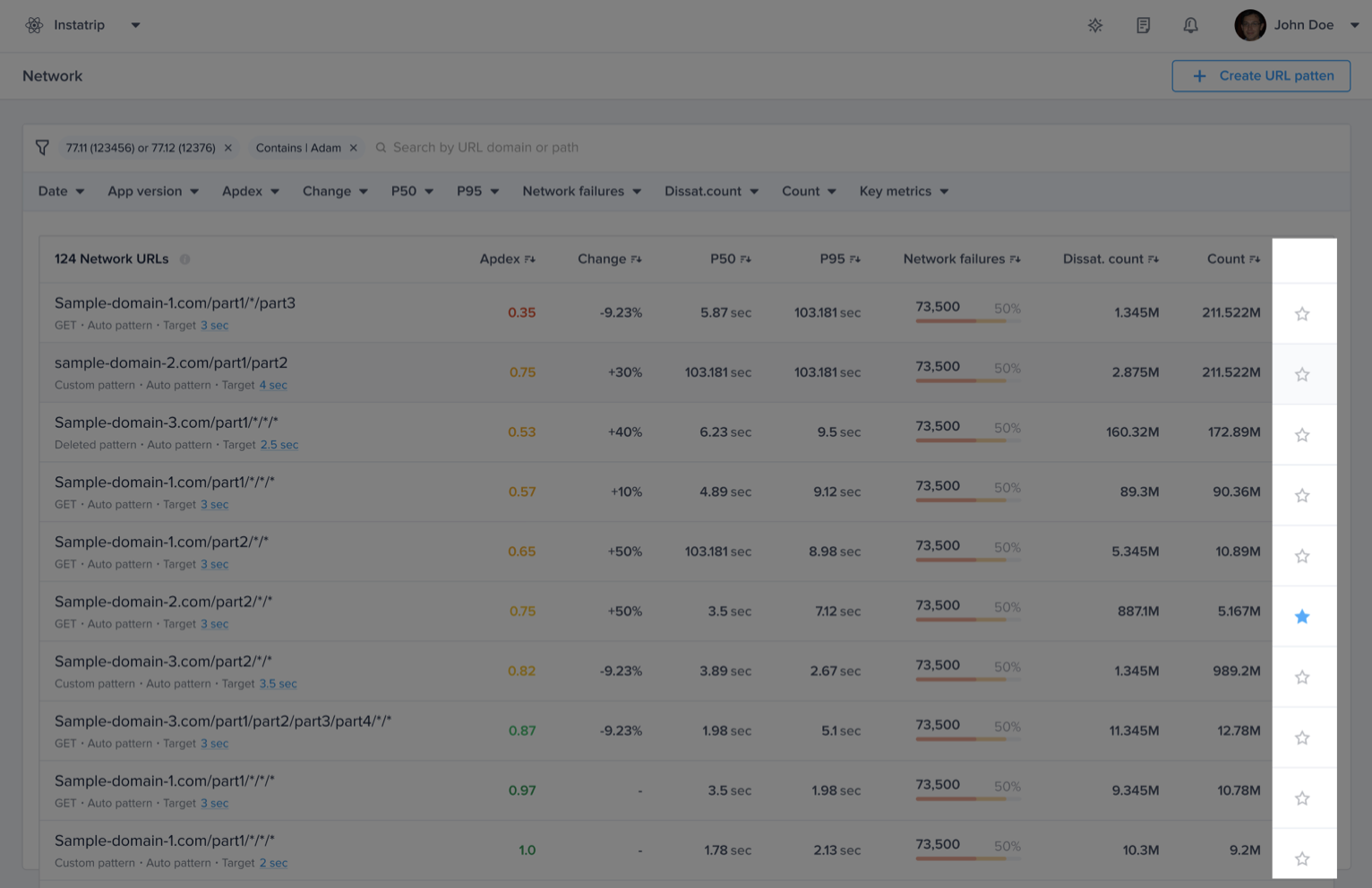
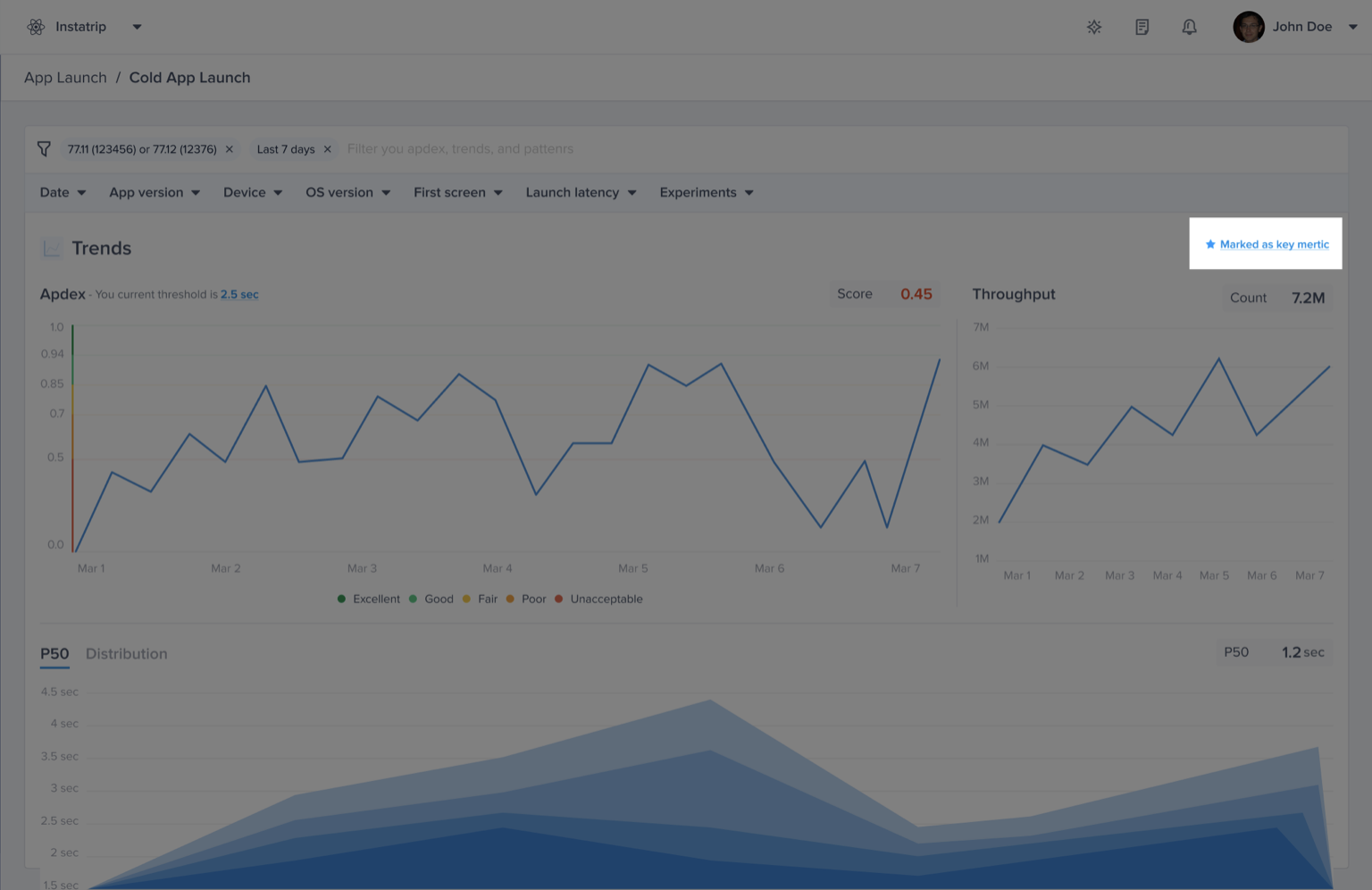
For **APM issues (App Launches, Flows, Networks, UI Hangs, Screen loading)**, which you can configure each trace as either a **Key Metric** or **Non-Key Metric**:
* **Key Metrics**: Affect your Frustration-Free Sessions score and issue prioritization.
* **Non-Key Metrics**: Do not contribute to session classification or affect the score.
By default, all traces are considered **Key Metrics**.
### Adjusting Key Metrics
You can exclude specific traces from your score in three ways:
1. From the **Issues List**
2. On the **List Page**
3. In the **Details Page** for the issue type
{% hint style="warning" %}
Updating your key metrics doesn't affect the already calculated app apdex and will be applied moving forward.
{% endhint %}
Fine-tuning these settings ensures that your frustration-free session score reflects only the most relevant signals for your app.
---
# Agent Instructions
This documentation is published with GitBook. GitBook is the documentation platform designed so that both humans and AI agents can read, navigate, and reason over technical content effectively. Learn more at gitbook.com.
## Querying This Documentation
If you need additional information that is not directly available in this page, you can query the documentation by asking a question.
Perform an HTTP GET request on the following URL with the `ask` and `goal` query parameters:
```
GET https://docs.luciq.ai/product-guides-and-integrations/product-guides/getting-started-with-luciq/frustration-free-sessions/how-to-configure-frustration-free-sessions.md?ask=&goal=
```
`ask` is the immediate question: it should be specific, self-contained, and written in natural language.
`goal` is what the user is ultimately trying to achieve, the reason they need the answer. Sharing it helps GitBook give you a better, more relevant answer. A goal is most helpful when it describes the outcome the user wants rather than restating the question. For example, with `ask=how do I create an API token`, a goal like `automate deployments from our CI pipeline` lets GitBook tailor the answer to that use case.
The response will contain a direct answer to the question and relevant excerpts and sources from the documentation.
Use this mechanism when the answer is not explicitly present in the current page, you need clarification or additional context, or you want to retrieve related documentation sections.