# Frustration-Free Sessions

### What is Frustration-Free Sessions?

Frustration-Free Sessions is a **north star KPI** that reflects user frustration. It helps you measure your app’s **stability and performance**, giving you a clear signal when users experience frustrating sessions.

The score ranges from **0% to 100%**, where a higher score means your users are facing fewer frustrating experiences.

### How Is Frustration-Free Sessions Calculated?

Luciq categorizes all user sessions into four types:

* **Crashing Sessions** → Sessions that end with a **fatal crash** or OOM.
* **Frustrating Sessions** → Sessions with major issues
* **Tolerable Sessions** → Sessions with minor issues
* **Satisfying Sessions** → Sessions with smooth performance

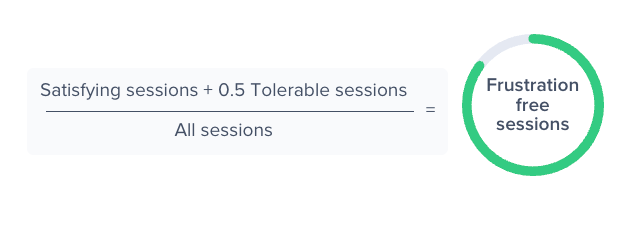
The Frustration-Free Sessions score is calculated as:

<figure><img src="https://files.readme.io/2ca89bda2f461864c261aac073a71ce3515e527bde6db164bb485e3feafa9899-664bf013-ae28-4ab2-a263-9dd29fe7f6f6.png" alt=""><figcaption></figcaption></figure>

### What Is a Session?

A session begins when a user **launches the app** or **brings it to the foreground**. It ends when the user **moves the app to the background** or when the app **exits** (either manually or due to a crash).

#### How Are Sessions Categorized?

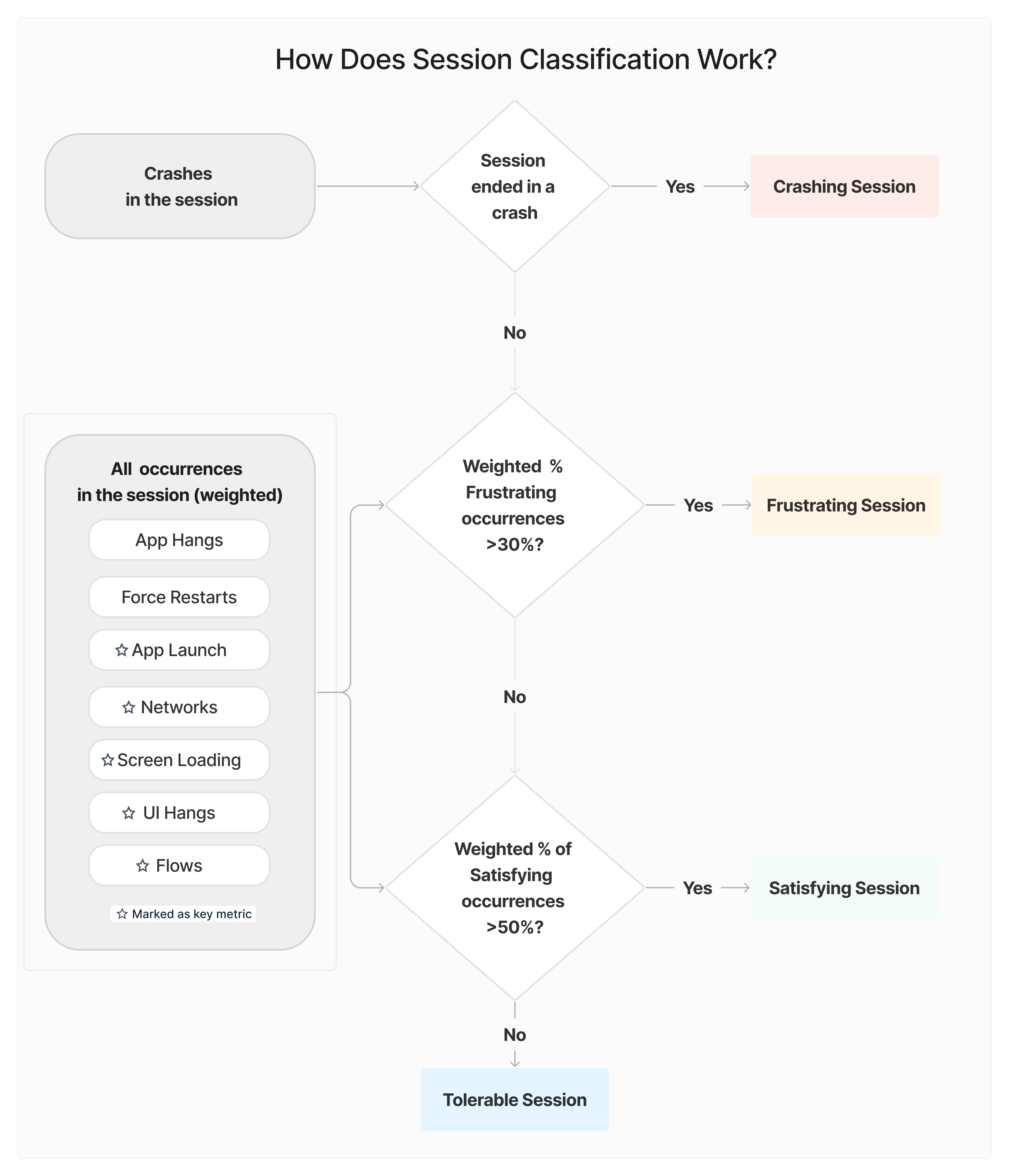
**Crashing Session**: If a session ends with a crash or an OOM, it is classified as crashing.

**Other Sessions**: If a session does not crash, it is categorized as **Frustrating, Tolerable, or Satisfying** based on the issues that occurred during the session.

<figure><img src="https://files.readme.io/5579da2851ec779971771f7db68d9cbd88942b092d945fe0a0556aebf57f4817-image-20250316-221816.png" alt=""><figcaption></figcaption></figure>

#### Example of Session Classification

Let's break down a session with multiple issues:

<table><thead><tr><th width="159.265625">Issue Type</th><th width="286.8515625">Impact Level</th><th>Occurrences</th></tr></thead><tbody><tr><td>App Hangs</td><td>High (an occurrence has a weight of 10 occurrences)</td><td>1 (all app hang occurrences are considered frustrating)</td></tr><tr><td>Network Requests</td><td>Low (an occurrence has a weight of 0.3 occurrences)</td><td><p>- 2 Frustrating</p><p>- 2 Tolerable</p><p>- 1 Satisfying</p></td></tr><tr><td>App Launch</td><td>Medium (an occurrence has a weight of 1 occurrence)</td><td>- 3 Frustrating</td></tr><tr><td>Flows</td><td>Medium (an occurrence has a weight of 1 occurrence)</td><td>- 2 Satisfying</td></tr></tbody></table>

**Step 1: Calculate Weighted Counts**

* Frustrating Count = (10 × 1) + (0.3 × 2) + (1 × 3) = 13.6
* Tolerable Count = (0.3 × 2) = 0.6
* Satisfying Count = (0.3 × 1) + (1 × 2) = 2.3
* Total Count = 13.6 + 0.6 + 2.3 = 16.5

**Step 2: Calculate Weighted Percentages**

* Frustrating% = 13.6 / 16.5 = 82%
* Tolerable% = 0.6 / 16.5 = 4%
* Satisfying% = 2.3 / 16.5 = 14%

**Step 3: Classify the Session**

* Frustrating Session → If Frustrating% ≥ 30%
* Satisfying Session → If Satisfying% ≥ 50%
* Tolerable Session → Otherwise

Since the Frustrating% is 82% which is over 30%, this session is classified as **Frustrating**.

#### How Is the Score Graded and Color-Coded?

| Score Range | Performance Level      |
| ----------- | ---------------------- |
| ≥ 94%       | **Excellent** (Green)  |
| 85% - 93.9% | **Good** (Light Green) |
| 70% - 84.9% | **Fair** (Yellow)      |
| 50% - 69.9% | **Poor** (Orange)      |
| < 50%       | **Unacceptable** (Red) |

### Want More Control Over Frustration-Free Sessions?

You can customize how Frustration-Free Sessions is calculated to better reflect your app’s needs.

👉 [Learn how to configure Frustration-Free Sessions](https://docs.luciq.ai/product-guides-and-integrations/product-guides/getting-started-with-luciq/frustration-free-sessions/how-to-configure-frustration-free-sessions)

<br>
