> For the complete documentation index, see [llms.txt](https://docs.luciq.ai/llms.txt). Markdown versions of documentation pages are available by appending `.md` to page URLs; this page is available as [Markdown](https://docs.luciq.ai/product-guides-and-integrations/product-guides/crash-reporting/force-restarts.md).
# Force Restarts
Learn how Luciq detects and reports forced app restarts. Understand how force restarts differ from traditional crashes and how they appear in your dashboard.
A Force Restart occurs when a user forcefully closes an app and immediately restarts it. The underlying frustration that prompts the user to restart the app often goes unnoticed by app developers, as it is not classified as a crash.
Luciq gives you visibility over Force Restarts, which are detected automatically. You can now detect these issues early on, and address them, so you can improve the app quality and retention.
### What does a Force Restart look like?
* User opened the App
* The App was very slow
* User closed the App and opened it again
### How can I see Force Restarts on the dashboard?
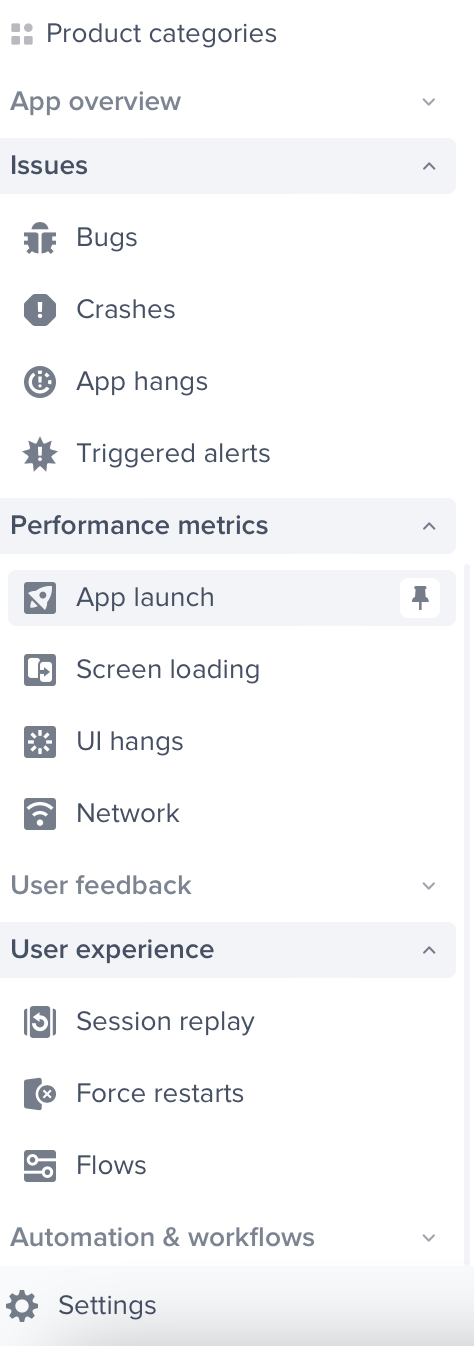
Force Restarts are captured by default. You can reach the Force Restarts section as shown in the screenshot below:
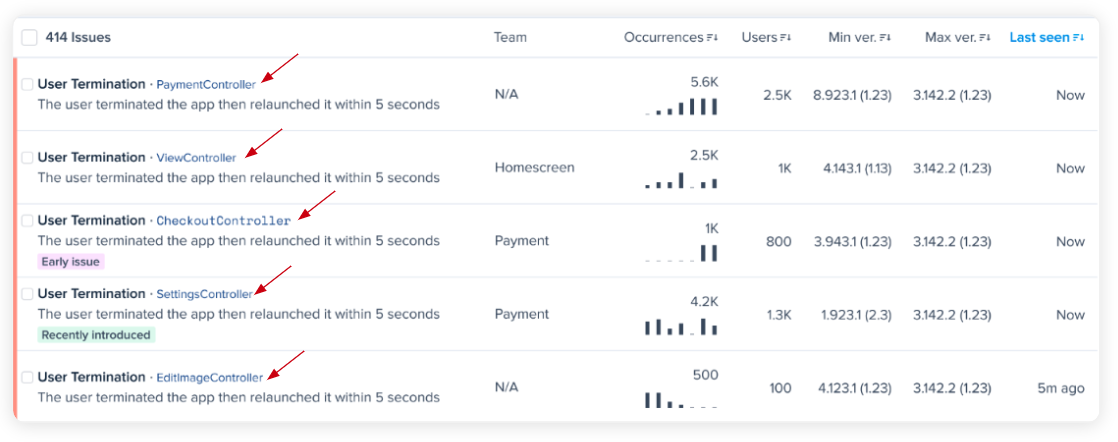
Similar terminations are grouped together by screen, as shown in the below screenshot.
{% hint style="info" %}
Force Restarts are grouped by events that happened on the same screen.
{% endhint %}
### What data is available in a Force Restart:
* Patterns to highlight which subset of users has triggered the highest number of Force Restarts.
* Occurrences view, where you can view every occurrence of the frustrating experience and what has led to it.
* Occurrences include the following debugging data:
* Metadata of the device
* [Session Profiler ](/ios/setup-luciq-for-ios/custom-settings/logs-and-profiling/session-profiler.md)to know the state of the device for the last 60 seconds before the Force Restart was triggered.
* [Repro steps](/ios/setup-luciq-for-ios/custom-settings/privacy-settings/repro-steps.md) which is a visual step by step reproduction of the session of the user, screen by screen and interaction by interaction on the app up until the user triggered the termination.
* [Logs section ](/ios/setup-luciq-for-ios/custom-settings/logs-and-profiling/report-logs.md)including console logs and network logs for all API calls that were made during the session.
Luciq's Force Restarts feature can be a critical tool for developers seeking to enhance their app's user experience. By notifying you of user frustrations in real-time, it provides you with the opportunity to address issues promptly, maintaining user satisfaction and improving app performance.
---
# Agent Instructions
This documentation is published with GitBook. GitBook is the documentation platform designed so that both humans and AI agents can read, navigate, and reason over technical content effectively. Learn more at gitbook.com.
## Querying This Documentation
If you need additional information that is not directly available in this page, you can query the documentation dynamically by asking a question.
Perform an HTTP GET request on the current page URL with the `ask` query parameter, and the optional `goal` query parameter:
```
GET https://docs.luciq.ai/product-guides-and-integrations/product-guides/crash-reporting/force-restarts.md?ask=&goal=
```
`ask` is the immediate question: it should be specific, self-contained, and written in natural language.
`goal` is optional and describes the broader end goal you are ultimately trying to accomplish on behalf of the user. GitBook uses it to tailor the answer towards what is most useful for that goal.
The response will contain a direct answer to the question and relevant excerpts and sources from the documentation.
Use this mechanism when the answer is not explicitly present in the current page, you need clarification or additional context, or you want to retrieve related documentation sections.