> For the complete documentation index, see [llms.txt](https://docs.luciq.ai/llms.txt). Markdown versions of documentation pages are available by appending `.md` to page URLs; this page is available as [Markdown](https://docs.luciq.ai/product-guides-and-integrations/product-guides/ai-features/resolve-agent.md).
# Resolve Agent
Learn how Resolve Agent uses AI to analyze crashes and bugs in your mobile app. Get automated root cause analysis, suggested fixes, and debugging help.
Resolve Agent is an AI agent that helps developers fix mobile app crashes directly from the Luciq dashboard. It analyzes crash data alongside your application source code, identifies the root cause, generates a code fix, and can open a pull request in your repository, all within minutes.
### Prerequisites
Resolve Agent requires a connected GitHub repository to access your source code. To get started:
{% hint style="info" %}
**Enablement:** Resolve Agent is enabled on a per-account basis. Contact your Customer Success Manager or reach out to Luciq Support to enable it.
**Source Code:** Connect your GitHub repository via [Source Code Connection - GitHub](/product-guides-and-integrations/product-guides/ai-features/resolve-agent/source-code-connection-github.md) before using Resolve Agent.
{% endhint %}
### Using Resolve Agent
Once enabled, the Resolve Agent widget appears at the top of each crash details page.
#### 1. Launch the agent
Click **"Launch Resolve Agent"** on any crash to start the analysis and fix generation process.
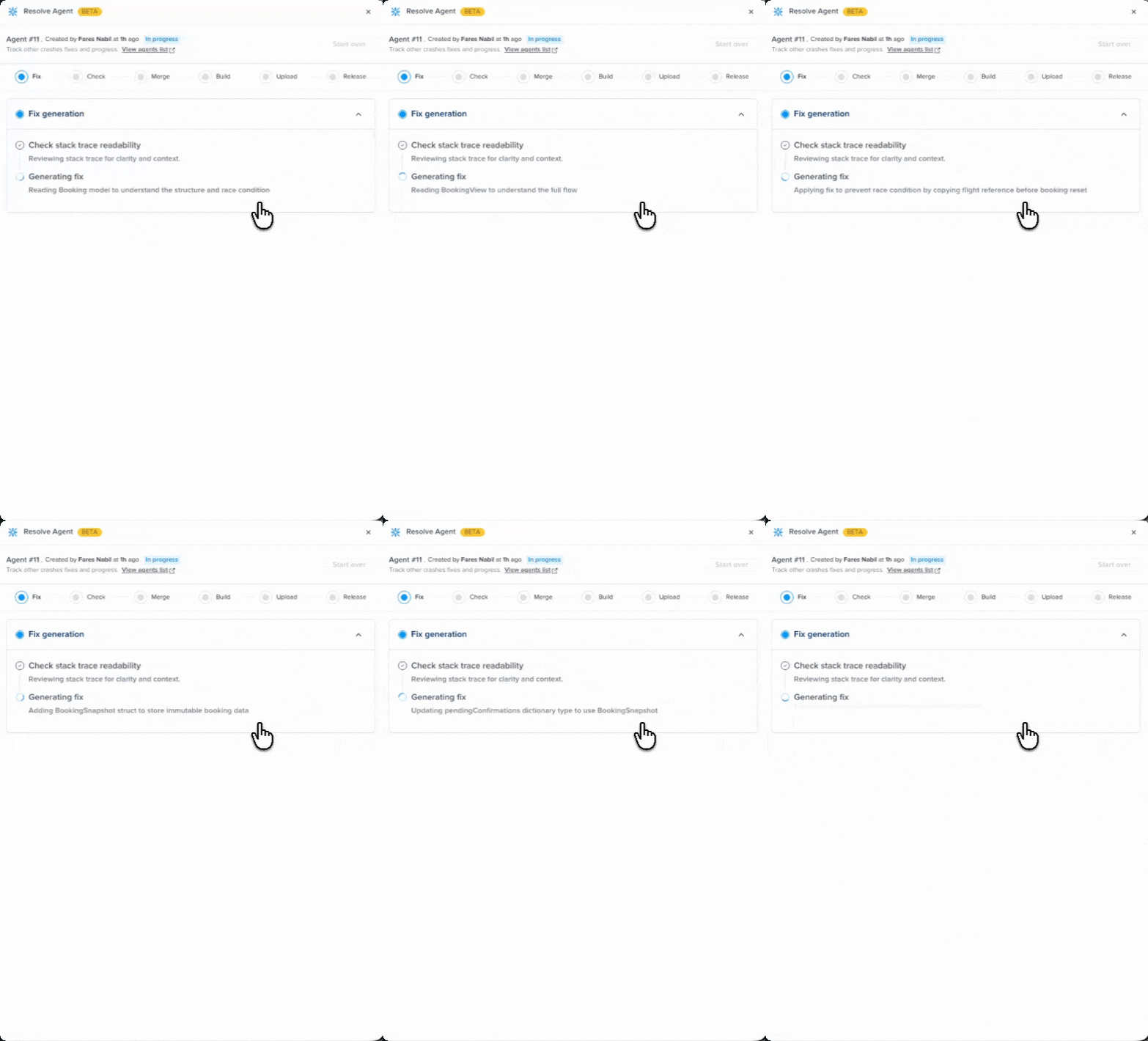
#### 2. Watch it work
The agent begins by checking the crash's stack trace for readability, then moves into fix generation. As it works, you'll see real-time progress messages describing what the agent is doing: reading specific files, tracing the crash origin, and building the fix. This typically takes one to two minutes depending on the complexity of the crash and the size of your codebase.
#### 3. Review the fix
Once complete, you'll see a root cause analysis explaining why the crash happened and a suggested code fix displayed as a diff, directly in the dashboard.
#### 4. Provide feedback (optional)
If the fix doesn't fully address the issue, you can provide feedback describing what's missing or what should change. The agent will use your input to generate an improved fix. You can iterate up to 5 times per crash.
#### 5. Create a pull request
When you're satisfied with a fix, click **"Create pull request"** to open a PR directly in your GitHub repository. Your team can review the changes, run CI checks, and merge when ready.
### Additional actions
* **View previous fixes:** All generated fixes are saved and accessible to your team.
* **Generate another fix:** Submit feedback to generate an additional fix suggestion.
* **Start over:** Delete all previous fixes and restart the analysis, useful when a new app version is available.
***
### How it works
#### Source code integration
Resolve Agent connects to your GitHub repository through the Luciq CodeLink GitHub App. This gives the agent read access to your source code so it can trace crash stack frames back to specific files and functions in your codebase.
#### Crash analysis
When you launch Resolve Agent on a crash, the agent analyzes the crash's stack trace and cross-references it with your source code to identify the root cause. It traces the execution path, examines the relevant code context, and determines what went wrong.
#### Fix generation
Based on the root cause analysis, the agent generates a code fix. You'll see the agent's progress in real time as it works through your codebase, with status messages describing each step it takes. The resulting fix is presented as a code diff with an explanation of the changes.
#### Feedback loop
If the initial fix isn't right, your feedback guides the next iteration. The agent incorporates your input and generates a new fix that addresses your specific concerns. Each crash supports up to 5 fix attempts.
#### Pull request creation
Resolve Agent uses your source code connection to create a pull request in your repository. The PR contains the fix changes and can go through your normal review and CI/CD pipeline before merging.
### Compatibility
| | Supported |
| ------------------------- | -------------------------------------------- |
| **Platforms** | iOS (Native), Android (Native), React Native |
| **Source code providers** | GitHub |
### Enablement and consent
Resolve Agent is enabled on a per-account basis. By requesting enablement, you grant Luciq permission to process crash data and application source code through its AI models in compliance with our [privacy policy](https://www.luciq.ai/privacy). Processing only occurs when you actively use the feature, and you can request to disable it at any time.
Only account admins or owners can request enablement. Once enabled, all team members with appropriate permissions can use the feature.
---
# Agent Instructions
This documentation is published with GitBook. GitBook is the documentation platform designed so that both humans and AI agents can read, navigate, and reason over technical content effectively. Learn more at gitbook.com.
## Querying This Documentation
If you need additional information that is not directly available in this page, you can query the documentation by asking a question.
Perform an HTTP GET request on the following URL with the `ask` and `goal` query parameters:
```
GET https://docs.luciq.ai/product-guides-and-integrations/product-guides/ai-features/resolve-agent.md?ask=&goal=
```
`ask` is the immediate question: it should be specific, self-contained, and written in natural language.
`goal` is what the user is ultimately trying to achieve, the reason they need the answer. Sharing it helps GitBook give you a better, more relevant answer. A goal is most helpful when it describes the outcome the user wants rather than restating the question. For example, with `ask=how do I create an API token`, a goal like `automate deployments from our CI pipeline` lets GitBook tailor the answer to that use case.
The response will contain a direct answer to the question and relevant excerpts and sources from the documentation.
Use this mechanism when the answer is not explicitly present in the current page, you need clarification or additional context, or you want to retrieve related documentation sections.

.png?alt=media)
%20(1).png?alt=media)
%20(1).png?alt=media)