> For the complete documentation index, see [llms.txt](https://docs.luciq.ai/llms.txt). Markdown versions of documentation pages are available by appending `.md` to page URLs; this page is available as [Markdown](https://docs.luciq.ai/organization-settings/others/email-notifications.md).
# Email Notifications
Manage the emails Luciq sends you. See what each dashboard flag controls for bug reports, crashes, team activity, and survey responses.
**Email Notifications** are emails you receive from Luciq. Whether you're managing bug reports, crashes, team activity, or survey responses, you can customize your notification preferences using dedicated dashboard flags.
This guide provides a clear breakdown of:
* How to **disable or manage email notifications?**
* The **purpose of each dashboard flag** and the emails they control.
### Managing Your Email Notifications
You can enable or disable email notifications directly from the **Email Notifications Dashboard** in your account settings.
**To Disable Notifications:**
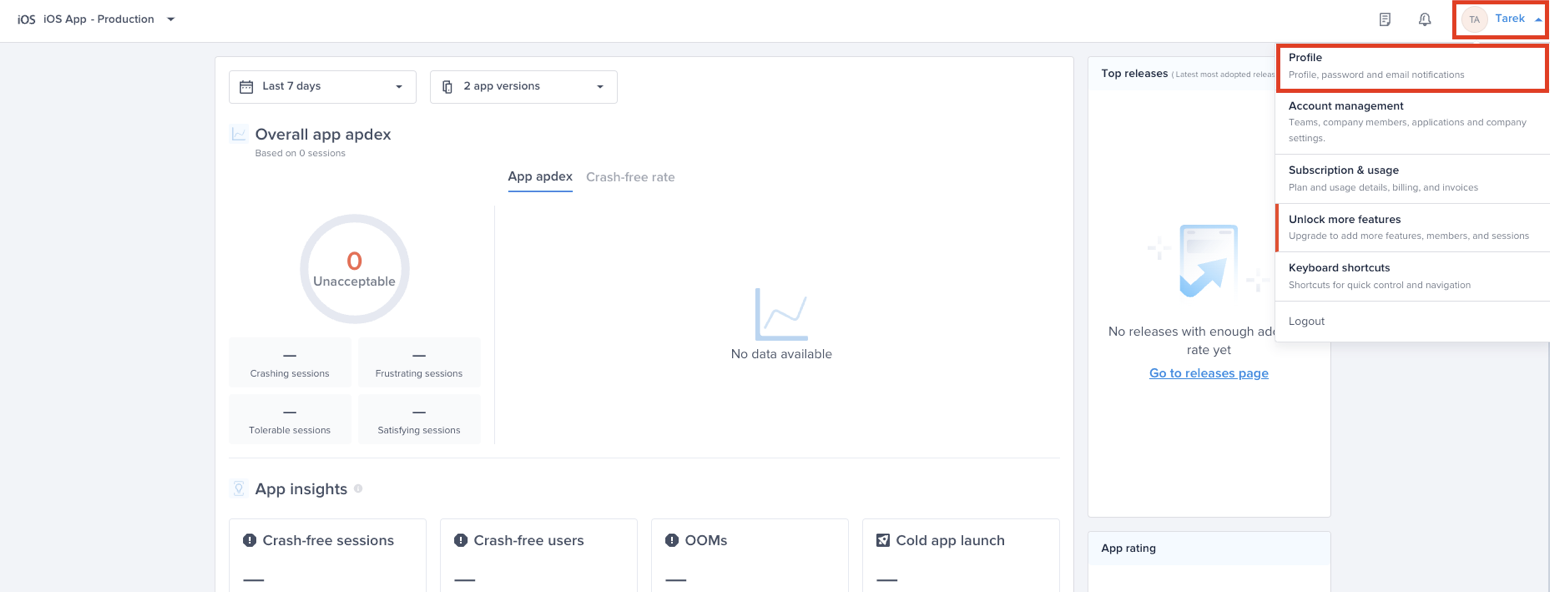
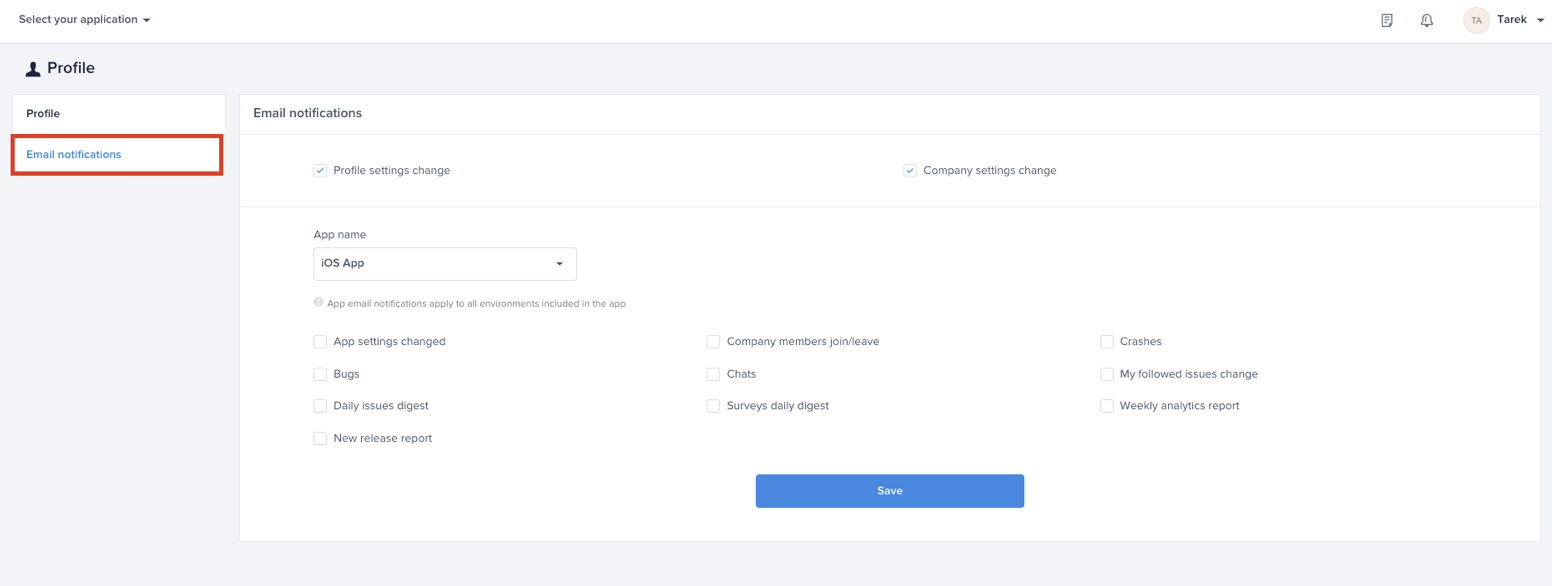
1. Navigate to **Profile > Email Notifications**.
2. Locate the **dashboard flag** related to the emails you want to disable.
3. Toggle the flag **OFF** to stop receiving those emails.
4. Changes are applied instantly.
{% hint style="warning" %}
Some critical system emails (e.g., security alerts) cannot be disabled.
{% endhint %}
### Email Notification Flags & Controlled Emails
#### Company account notifications
* Profile settings change: Notifies you about changes in your profile such as: username, password, and social logins.
* Company settings change: Notifies you about changes to the company name on Luciq’s dashboard.
* Company members join/leave notifies you about users requesting to join or removed from your company dashboard on Luciq.
#### Application notifications
* App settings changed notifies you about changes to the application settings.
* App members removed notifies you about company members removed from an application and not from the company dashboard.
* New/reopened crashes notifies you when your application received a new crash or when a closed crash is reopened.
* New bugs notifies you when your application receive a new bug.
* New chats notifies you when your application receives a new In-app chat.
* My followed issues change notifies you about changes to the issues you are assigned to. For example: A bug you are assigned received a comment or got deleted.
* Surveys daily digest send you a summary of your applications' surveys responses.
* New release report notifies you about the performance of your new top releases.
{% hint style="info" %}
This documentation ensures you have full visibility into your email settings, reducing unnecessary noise while keeping you informed of what matters most. If you need further help, please contact our [support team](mailto:contactus@luciq.ai).
{% endhint %}
---
# Agent Instructions
This documentation is published with GitBook. GitBook is the documentation platform designed so that both humans and AI agents can read, navigate, and reason over technical content effectively. Learn more at gitbook.com.
## Querying This Documentation
If you need additional information that is not directly available in this page, you can query the documentation dynamically by asking a question.
Perform an HTTP GET request on the current page URL with the `ask` query parameter, and the optional `goal` query parameter:
```
GET https://docs.luciq.ai/organization-settings/others/email-notifications.md?ask=&goal=
```
`ask` is the immediate question: it should be specific, self-contained, and written in natural language.
`goal` is optional and describes the broader end goal you are ultimately trying to accomplish on behalf of the user. GitBook uses it to tailor the answer towards what is most useful for that goal.
The response will contain a direct answer to the question and relevant excerpts and sources from the documentation.
Use this mechanism when the answer is not explicitly present in the current page, you need clarification or additional context, or you want to retrieve related documentation sections.