> For the complete documentation index, see [llms.txt](https://docs.luciq.ai/llms.txt). Markdown versions of documentation pages are available by appending `.md` to page URLs; this page is available as [Markdown](https://docs.luciq.ai/android/set-up-luciq-for-android/identify-users/user-identification.md).
# User Identification
Identify users in your Android app with Luciq to get richer context in bug reports and crashes. Link reports to specific users for faster issue resolution.
Luciq helps you better identify the bug reports or feedback you get by associating a user's identity to them.
### User Email and Name
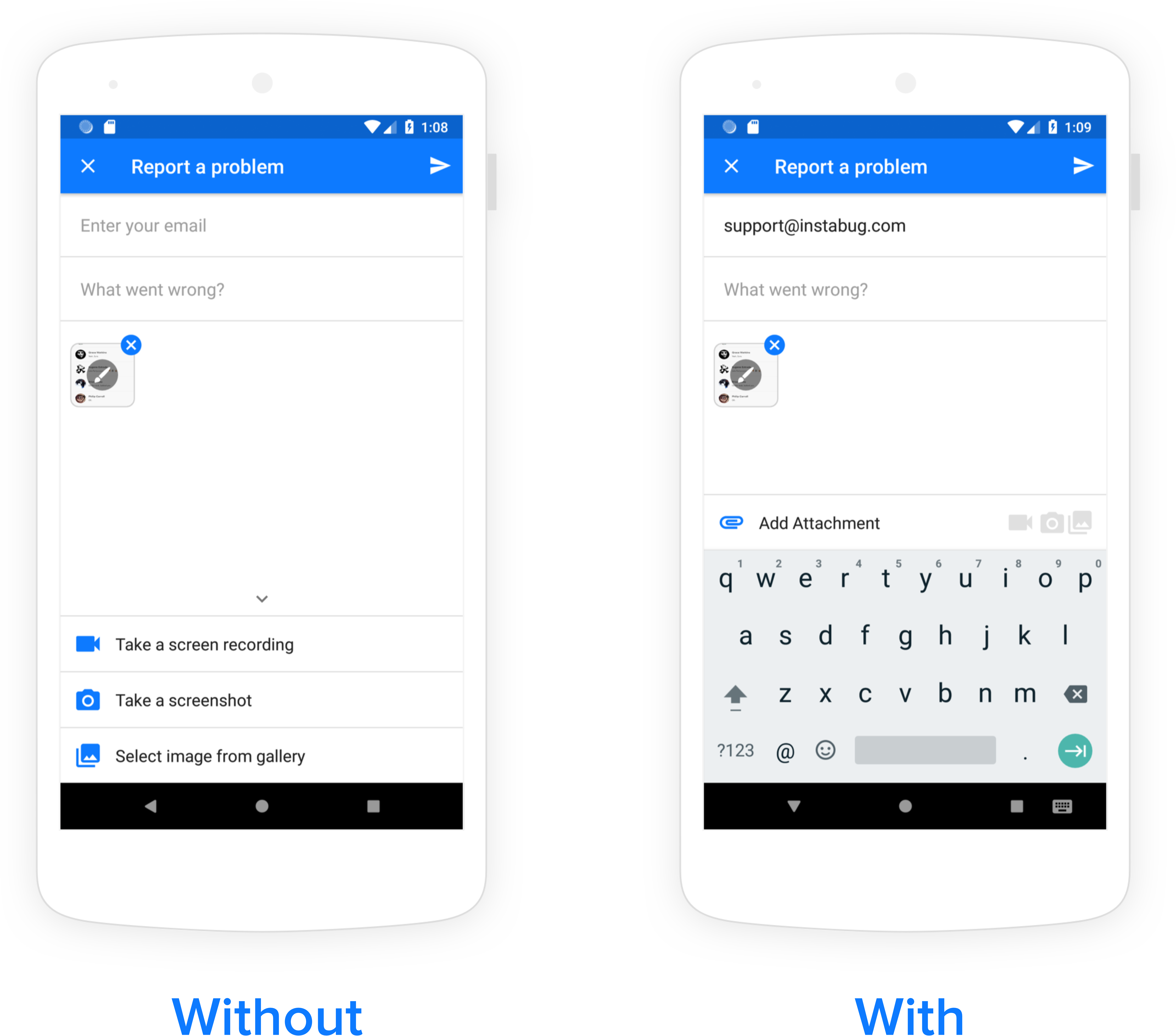
If you already have a user's name and email, you can pre-fill the email field in the bug, feedback, and question reporting flow. The user will then be identified in all reports (bugs, improvements, questions), crashes, surveys, and feature requests.
An example of a pre-filled email field in the bug reporting form.
Ideally, this API should be called as soon as a user logs into your app.
{% tabs %}
{% tab title="Kotlin" %}
{% code overflow="wrap" %}
```kotlin
Luciq.identifyUser({user_name (optional)}, {user_email (optional)}, {id (optional)})
```
{% endcode %}
{% endtab %}
{% tab title="Java" %}
{% code overflow="wrap" %}
```java
Luciq.identifyUser({user_name (optional)}, {user_email (optional)}, {id (optional)})
```
{% endcode %}
{% endtab %}
{% endtabs %}
{% hint style="warning" %}
### Null Values
If both the email and ID parameters are empty or null, the user will not be identified, and the SDK will through an error.
{% endhint %}
### User Data
You can also add additional data about your users. This API is best used for dumping large amounts of data. Each call to this method overrides the user data to be attached. The maximum length of the string is 1,000 characters.
{% tabs %}
{% tab title="Kotlin" %}
{% code overflow="wrap" %}
```kotlin
Luciq.setUserData("User data")
```
{% endcode %}
{% endtab %}
{% tab title="Java" %}
{% code overflow="wrap" %}
```java
Luciq.setUserData("User data");
```
{% endcode %}
{% endtab %}
{% endtabs %}
### Logout
When a user logs out, the following API should be called. Calling `logOut` will reset the value of the email and name previously set. It will also remove any currently set user attributes, user events, user chats, and user data.
{% tabs %}
{% tab title="Kotlin" %}
{% code overflow="wrap" %}
```kotlin
Luciq.logoutUser()
```
{% endcode %}
{% endtab %}
{% tab title="Java" %}
{% code overflow="wrap" %}
```java
Luciq.logoutUser();
```
{% endcode %}
{% endtab %}
{% endtabs %}
{% hint style="warning" %}
### Logout only when user is identified
Please note that if the user is currently not identified using the `identifyUser` API, the `logOut` method will have no effect.
{% endhint %}
{% hint style="info" %}
### Isolating sessions per user
If multiple users sign in and out on the same device within a single app session, Luciq can automatically start a new session on logout so that each user's activity is attributed to the correct identity. This behavior is disabled by default — reach out to the customer support team to enable it. It is available starting from Android SDK v19.8.0.
{% endhint %}
---
# Agent Instructions
This documentation is published with GitBook. GitBook is the documentation platform designed so that both humans and AI agents can read, navigate, and reason over technical content effectively. Learn more at gitbook.com.
## Querying This Documentation
If you need additional information that is not directly available in this page, you can query the documentation dynamically by asking a question.
Perform an HTTP GET request on the current page URL with the `ask` query parameter, and the optional `goal` query parameter:
```
GET https://docs.luciq.ai/android/set-up-luciq-for-android/identify-users/user-identification.md?ask=&goal=
```
`ask` is the immediate question: it should be specific, self-contained, and written in natural language.
`goal` is optional and describes the broader end goal you are ultimately trying to accomplish on behalf of the user. GitBook uses it to tailor the answer towards what is most useful for that goal.
The response will contain a direct answer to the question and relevant excerpts and sources from the documentation.
Use this mechanism when the answer is not explicitly present in the current page, you need clarification or additional context, or you want to retrieve related documentation sections.