> For the complete documentation index, see [llms.txt](https://docs.luciq.ai/llms.txt). Markdown versions of documentation pages are available by appending `.md` to page URLs; this page is available as [Markdown](https://docs.luciq.ai/android/set-up-luciq-for-android/identify-users/setting-custom-data.md).
# Setting Custom Data
Attach custom user attributes to Android reports so you can filter them on the dashboard. Includes the 100 attribute cap and key and value limits.
### User Attributes
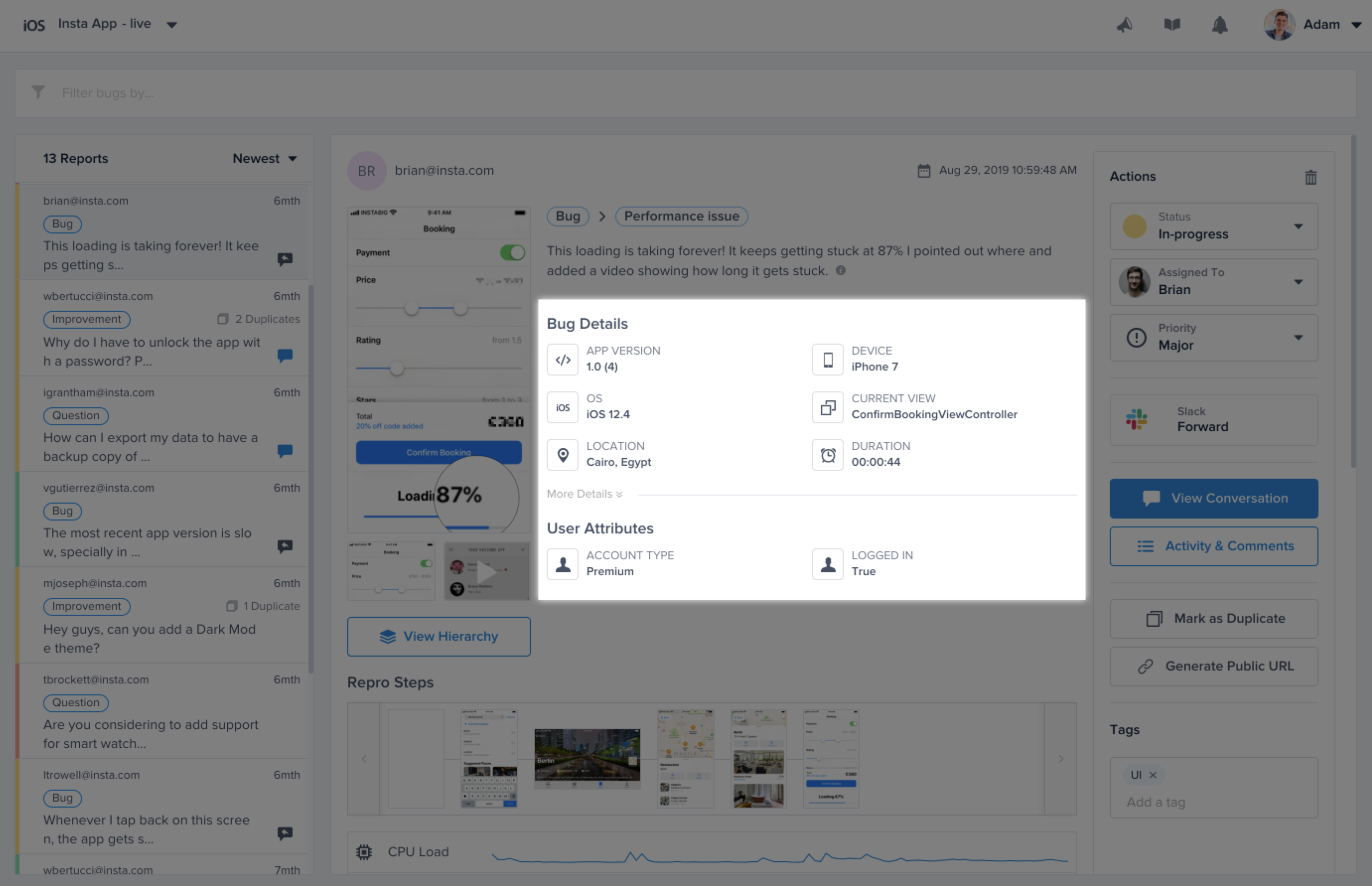
You can assign custom attributes to your users and they will show up on your Luciq dashboard with each report. These attributes can later be used to filter reports in your dashboard.
To add a new user attribute use the following method.
{% tabs %}
{% tab title="Kotlin" %}
{% code overflow="wrap" %}
```kotlin
Luciq.setUserAttribute("Age", "18")
Luciq.setUserAttribute("Logged", "True")
```
{% endcode %}
{% endtab %}
{% endtabs %}
{% hint style="info" %}
Disclaimers:
* Each Bug or Crash Report could have up to 100 user attributes only.
* The character limit for the Keys and Values is 90 characters each.
{% endhint %}
You can also retrieve the current value of a certain user attribute, or retrieve all user attributes.
{% tabs %}
{% tab title="Kotlin" %}
{% code overflow="wrap" %}
```kotlin
// Getting specific attribute
Luciq.getUserAttribute("Logged in")
// Getting all attributes
Luciq.getAllUserAttributes();
```
{% endcode %}
{% endtab %}
{% endtabs %}
Or remove the current value of a certain user attribute
{% tabs %}
{% tab title="Kotlin" %}
{% code overflow="wrap" %}
```kotlin
Luciq.removeUserAttribute("Completed IAP")
```
{% endcode %}
{% endtab %}
{% endtabs %}
### User Events
You can log custom user events throughout your application. Custom events are automatically included with each report.
{% tabs %}
{% tab title="Kotlin" %}
{% code overflow="wrap" %}
```kotlin
Luciq.logUserEvent("OnFeedbackButtonClicked")
```
{% endcode %}
{% endtab %}
{% endtabs %}
#### Logging User Events with Parameters
Starting from SDK version **19.7.0**, you can attach key-value parameters to a user event to capture additional context. Pass one or more `UserEventParam` instances after the event name.
{% tabs %}
{% tab title="Kotlin" %}
{% code overflow="wrap" %}
```kotlin
Luciq.logUserEvent(
"Completed Purchase",
UserEventParam("item", "Premium Plan"),
UserEventParam("currency", "USD")
)
```
{% endcode %}
{% endtab %}
{% endtabs %}
{% hint style="info" %}
#### Scope and behavior
* Starting from SDK version **19.10.0**, event names are cleaned up before being recorded: surrounding whitespace and any newline characters are removed, and names are limited to 200 characters. Events with an empty name are not recorded and log a console error.
* Keys are limited to 50 characters and values to 200 characters. Parameters that are empty, exceed these limits, or repeat a key already added in the same call are dropped with a console error. For duplicate keys, the first occurrence is kept.
* Up to 15 parameters can be attached to a single event. Any parameters beyond the limit are dropped with a console error.
{% endhint %}
### Tags
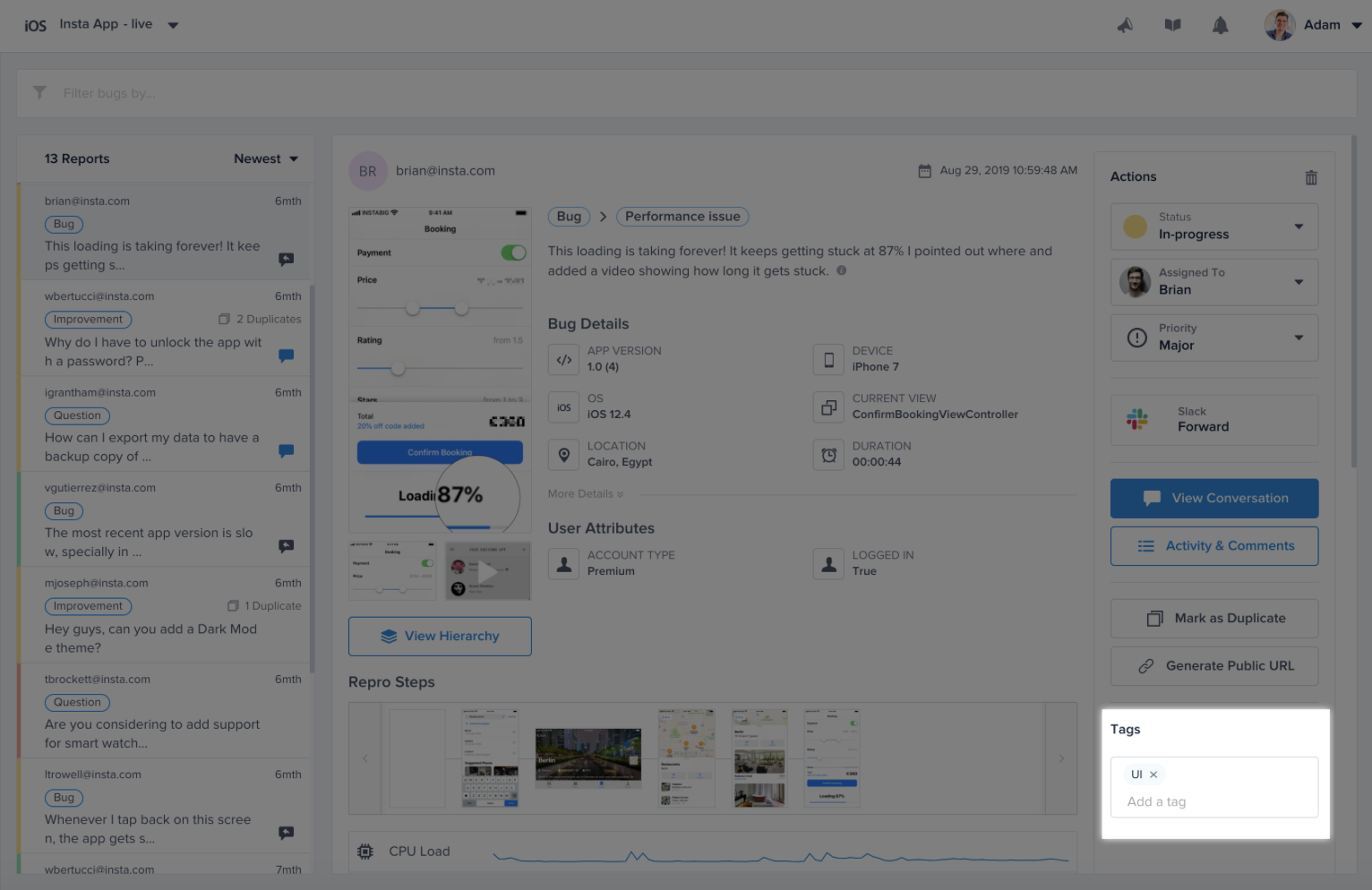
You can add custom tags to your bug and crash reports. These tags can later be used to filter reports or set custom rules from your dashboard.
The example below demonstrates how to add tags to a report.
{% tabs %}
{% tab title="Kotlin" %}
{% code overflow="wrap" %}
```kotlin
Luciq.addTags("Tag 1", "Tag 2")
```
{% endcode %}
{% endtab %}
{% endtabs %}
You can remove specific tags you added. Tags that aren't currently set are ignored.
{% hint style="info" %}
`Luciq.removeTags` requires a minimum Luciq Android SDK version of v19.14.0.
{% endhint %}
{% tabs %}
{% tab title="Kotlin" %}
{% code overflow="wrap" %}
```kotlin
Luciq.removeTags("Tag 1")
```
{% endcode %}
{% endtab %}
{% endtabs %}
{% hint style="info" %}
#### Adding tags before sending reports
Sometimes it's useful to be able to add a tag to a report right before it's sent. In these cases, use `Luciq.setOnBeforeSendHandler` and call `appendTags` on the event. See [Bug Reporting Callbacks](/android/set-up-luciq-for-android/set-up-bug-reporting/bug-reporting-callbacks.md#before-sending-a-report).
{% endhint %}
You can also get all the currently set tags as follows.
{% hint style="warning" %}
`Luciq.getTags` is deprecated as of SDK version 19.14.0, with no replacement, and it may return an empty list. Your tags are still attached to reports. If you need to read them back, keep your own copy of the tags you add.
{% endhint %}
{% tabs %}
{% tab title="Kotlin" %}
{% code overflow="wrap" %}
```kotlin
Luciq.getTags()
```
{% endcode %}
{% endtab %}
{% endtabs %}
Last, you can reset all the tags.
{% tabs %}
{% tab title="Kotlin" %}
{% code overflow="wrap" %}
```kotlin
Luciq.resetTags()
```
{% endcode %}
{% endtab %}
{% endtabs %}
#### Managing Tags
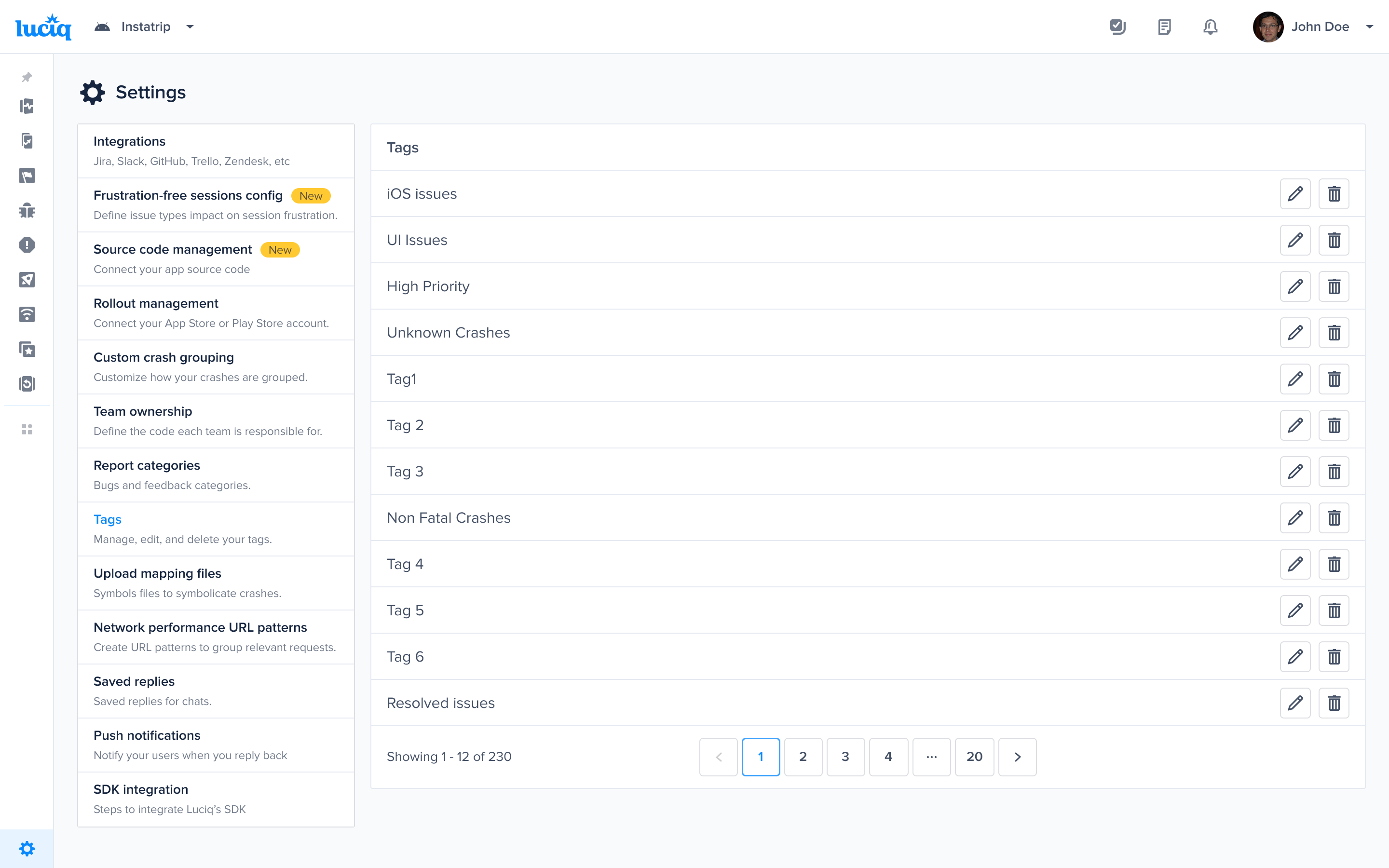
If you'd like to remove a particular tag from your dashboard to prevent it from appearing again when entering a new tag manually, you can do so by navigating to the tags page under the settings options and remove the tag. You can also edit and rename the tag.
***
### Feature Flags
In certain scenarios, you might find that you're rolling out different experiments to different users, where your user base would see different features depending on what's enabled for them. In scenarios such as these, you'll want to keep track of the enabled experiments for each user and even filter by them.
**Notes:**
1. **Feature Flag Naming**: Each feature flag name should not exceed 70 characters and each variant name should not exceed 70 characters. Otherwise, they will get ignored by the SDK. Note that feature flag names are case-insensitive.
2. **Feature Flag Persistence**: Feature flag persist beyond individual sessions and are not automatically removed at the end of a session. Additionally, calling the logOut function does not impact the existence of the feature flag. The feature flag is only removed when you call the removing method or the clearing method.
3. The amount of feature flags sent in a session is 200 with maximum of 1 variant per a multivariate feature flag. For example, a feature flag that has 3 variants sent within 1 session will only be sent to our backend as the last variant, and not all 3.
For more information on feature flags, visit Feature Flags.
#### Adding Feature Flags
#### Boolean Feature Flags - Example Usage
Below is an example of where in your code you would use feature flag. In this example, you are experimenting with feature logic that controls whether or not the user has a Dark Mode toggle available.
{% tabs %}
{% tab title="Kotlin" %}
{% code overflow="wrap" %}
```kotlin
Luciq.addFeatureFlag(LuciqFeatureFlag("dark_mode"))
```
{% endcode %}
{% endtab %}
{% endtabs %}
#### Multivariant Feature Flags - Example Usage
Below is an example of where in your code you would use feature flag with multiple variants. In this example, you are experimenting with feature logic that controls multiple versions of a specific feature.
{% tabs %}
{% tab title="Kotlin" %}
{% code overflow="wrap" %}
```kotlin
Luciq.addFeatureFlag(LuciqFeatureFlag("checkout_v2", "variant_b"))
```
{% endcode %}
{% endtab %}
{% endtabs %}
#### Removing Feature Flags
If your feature flag is concluded or you would like to simply remove it, you can use this method:
{% tabs %}
{% tab title="Kotlin" %}
{% code overflow="wrap" %}
```kotlin
Luciq.removeFeatureFLag("dark_mode"); // remove single key
Luciq.removeFeatureFlag(listOf("dark_mode", "checkout_v2")) // remove several at once
```
{% endcode %}
{% endtab %}
{% endtabs %}
#### Clearing Feature Flags
You can use the below method to clear all the Feature Flags from your reports:
{% tabs %}
{% tab title="Kotlin" %}
{% code overflow="wrap" %}
```kotlin
Luciq.removeAllFeatureFlags()
```
{% endcode %}
{% endtab %}
{% endtabs %}
---
# Agent Instructions
This documentation is published with GitBook. GitBook is the documentation platform designed so that both humans and AI agents can read, navigate, and reason over technical content effectively. Learn more at gitbook.com.
## Querying This Documentation
If you need additional information that is not directly available in this page, you can query the documentation by asking a question.
Perform an HTTP GET request on the following URL with the `ask` and `goal` query parameters:
```
GET https://docs.luciq.ai/android/set-up-luciq-for-android/identify-users/setting-custom-data.md?ask=&goal=
```
`ask` is the immediate question: it should be specific, self-contained, and written in natural language.
`goal` is what the user is ultimately trying to achieve, the reason they need the answer. Sharing it helps GitBook give you a better, more relevant answer. A goal is most helpful when it describes the outcome the user wants rather than restating the question. For example, with `ask=how do I create an API token`, a goal like `automate deployments from our CI pipeline` lets GitBook tailor the answer to that use case.
The response will contain a direct answer to the question and relevant excerpts and sources from the documentation.
Use this mechanism when the answer is not explicitly present in the current page, you need clarification or additional context, or you want to retrieve related documentation sections.